
How to Track No-Result Searches in Hotel Booking Analytics
# How to Track No-Result Searches in Hotel Booking Analytics
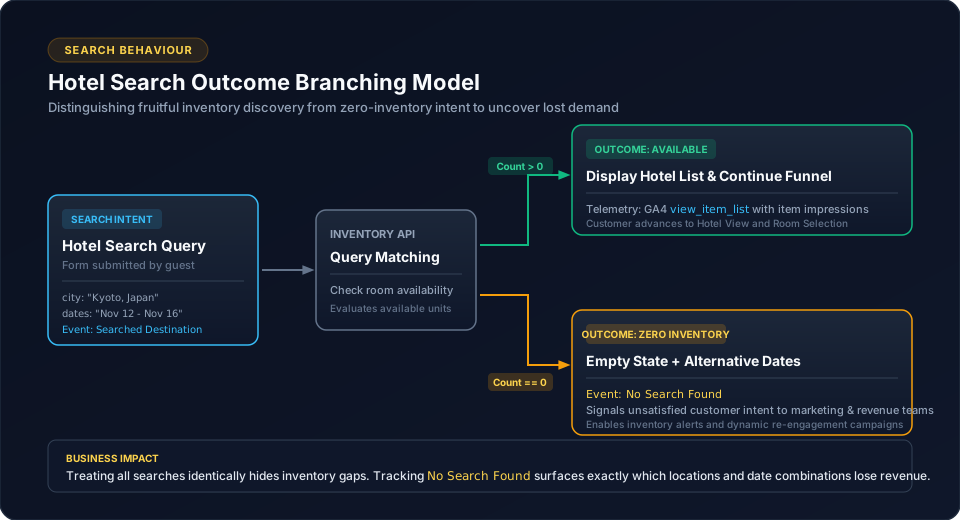
A hotel search that produces no useful result is more than an unsuccessful API response.
It represents a customer who expressed booking intent but did not find suitable inventory.
For analytics, this behaviour can be valuable.
Search
  |
  +---- Results found
  |
  +---- No useful result
The application should distinguish these outcomes rather than treating every search as identical.
1. Why No-Result Searches Matter
Consider two customers:
Customer A
Search → Hotels displayed → Continue browsing
and:
Customer B
Search → No useful result → Leaves
Both performed a search, but their experiences were different.
A no-result event makes that distinction visible.
2. Define a Dedicated Event
The implementation includes:
No Search Foundas a Klaviyo behaviour event.
This represents a customer-level behaviour signal.
For broader analytics, the application can also distinguish the search outcome in its analytics model where appropriate.
3. Separate Search From Search Outcome
The conceptual model is:
search
  ↓
Search processing
  ↓
Outcome
  ├── results
  └── no result
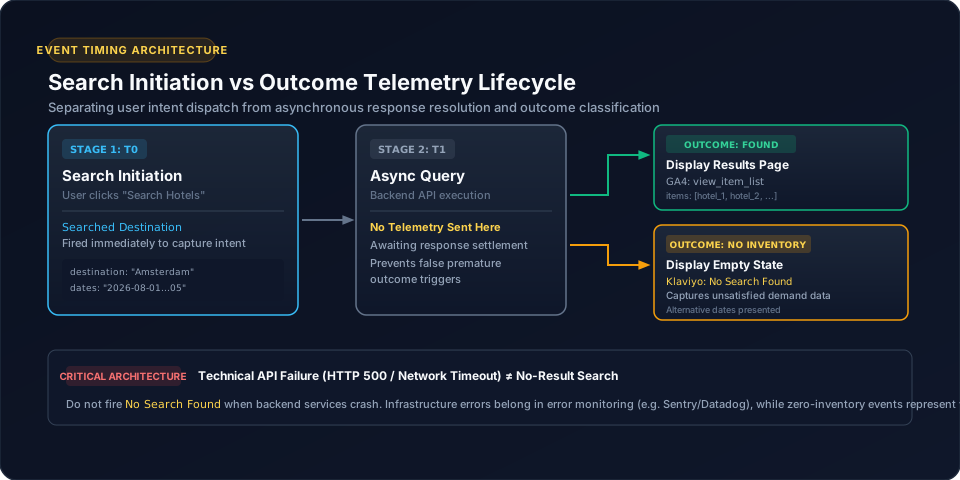
Do not replace the original search event with the outcome.
They represent different stages.
4. What Context Is Useful?
The event should contain the relevant search context defined by the analytics contract.
Potential business dimensions include:
Do not automatically send the entire search request object.
5. Why This Is Useful for a Hotel Platform
No-result searches can help answer questions such as:
These are product and marketing questions, not merely technical API questions.
6. Customer Behaviour Perspective
In Klaviyo, a no-result search can be part of the customer lifecycle:
Customer
   ↓
Search destination
   ↓
No Search Found
This creates a distinct behaviour signal from a successful search.
7. Keep Event Timing Correct
The no-result event should be generated after the application has determined that the search produced no suitable result.
Do not fire it merely because a request started.
Request started
      ≠
No result confirmed
8. Centralize the Mapping
Use:
this.analyticsService.trackNoSearchFound(data);rather than calling Klaviyo directly from the search component.
This keeps the provider-specific implementation centralized.
9. Testing
Test at least:
Search with results
Search without results
Search with temporary loading state
Search error
Repeated search
The important distinction is between:
No resultand:
Technical failureThey should not automatically be treated as the same business behaviour.
10. Common Mistakes
11. Conclusion
No-result searches are meaningful signals because they represent expressed customer intent without successful inventory discovery.
For hotel booking applications, separating search, successful result and no-result behaviour creates a clearer analytics model and provides useful information for both customer lifecycle tracking and product analysis.
Related Content
Need enterprise architecture consulting?
Explore our real-world case studies detailing production migrations, performance scaling, and high-throughput gateways.