
Klaviyo Event Tracking for Hotel Booking Applications
# Klaviyo Event Tracking for Hotel Booking Applications
A hotel booking application produces valuable customer behaviour before a booking occurs.
Customers search for destinations, view hotels, save properties, begin checkout and eventually confirm a booking.
Klaviyo event tracking can represent these behaviours as a customer lifecycle.
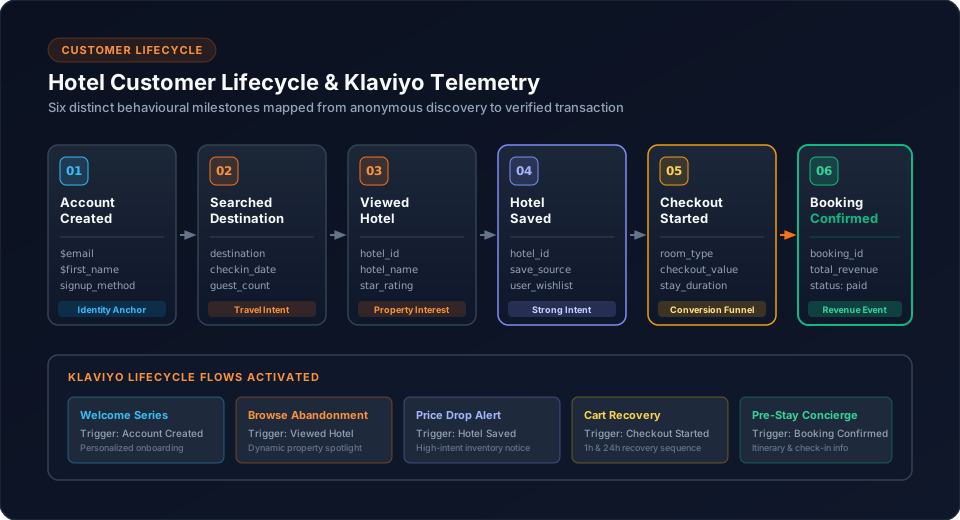
1. Start With Customer Behaviour
The goal is not to send every UI interaction.
Instead, identify meaningful behaviour:
Account Created
      ↓
Searched Destination
      ↓
Viewed Hotel
      ↓
Hotel Saved
      ↓
Checkout Started
      ↓
Booking Confirmed
Each event should answer a useful marketing or lifecycle question.
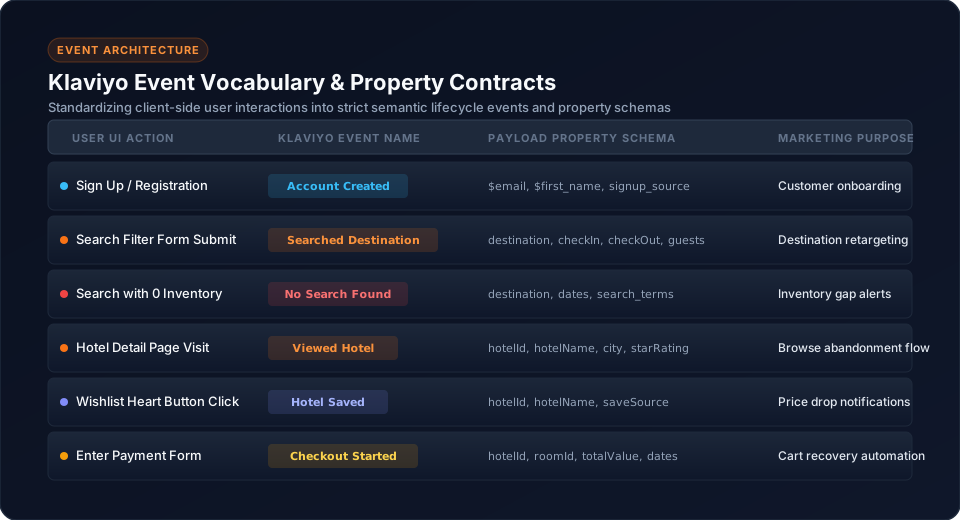
2. Define a Consistent Event Vocabulary
The implementation uses:
| Event | Meaning |
|---|---|
Account Created | New customer |
Searched Destination | Search behaviour |
No Search Found | Search produced no useful result |
Viewed Hotel | Hotel interest |
Hotel Saved | Stronger hotel intent |
Checkout Started | Booking intent |
Booking Confirmed | Completed booking |
3. Identify the Customer
Behaviour events need customer context.
The implementation uses:
$email
$first_name
$last_name
The customer identity should be established consistently before subsequent behaviour is associated with that customer.
4. Track Search Behaviour
A search can be represented by:
this.analyticsService.trackKlaviyoSearch({
  destination,
  checkIn,
  checkOut,
  guests
});
The event should contain useful context without sending the entire application state.
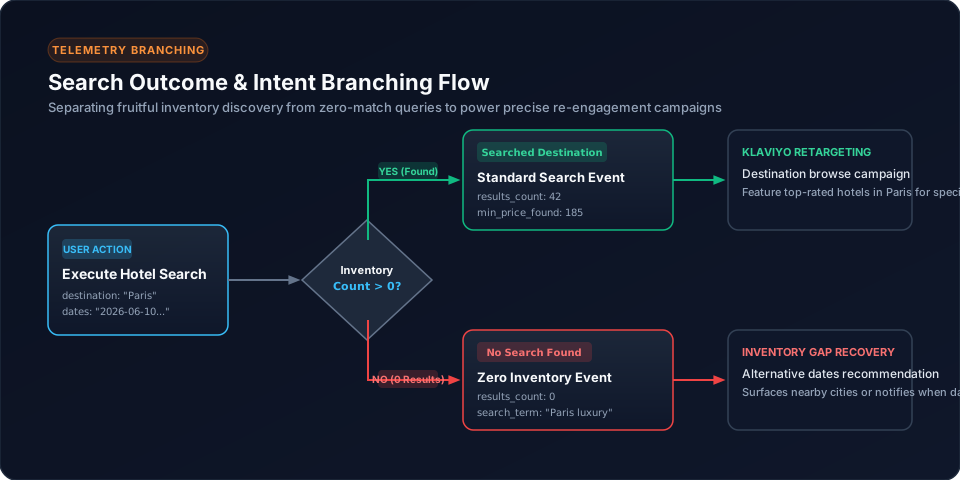
5. Track No-Result Searches
A no-result search is a distinct behaviour:
Search
  |
  +---- Results → Continue
  |
  +---- No results → No Search Found
This is more informative than treating all searches identically.
6. Track Hotel Views
Hotel views indicate customer interest.
this.analyticsService.trackHotelView({
  hotelId,
  hotelName
});
Use stable hotel identifiers so later analysis can relate repeated views to the same property.
7. Track Saved Hotels
Saving a hotel indicates stronger intent than simply viewing it.
Viewed Hotel
     ↓
Hotel Saved
This creates a useful lifecycle signal.
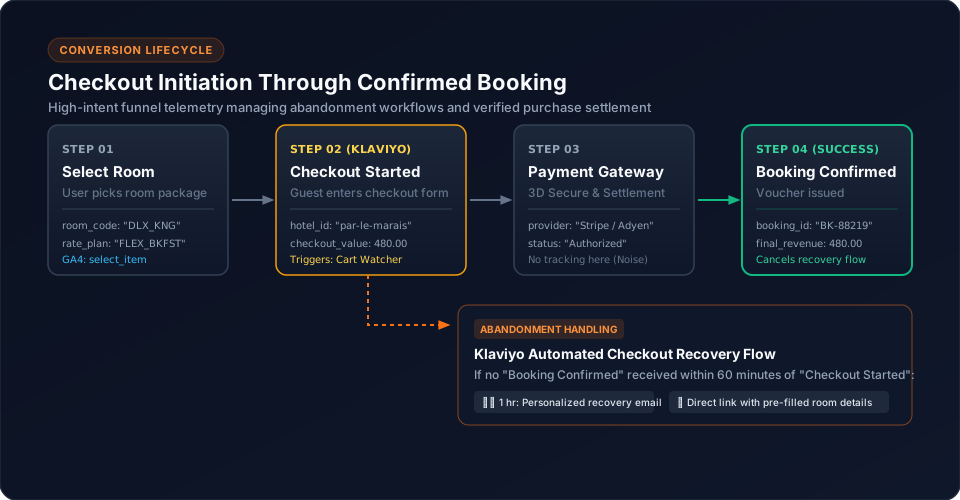
8. Track Checkout Started
Checkout represents a major change in intent:
Browse
  ↓
Hotel
  ↓
Room / option
  ↓
Checkout Started
The event should contain the relevant booking context defined by the application analytics contract.
9. Track Booking Confirmation
The completed booking is represented by:
Booking ConfirmedThis should occur after successful booking completion, not merely after entering the checkout screen.
10. Design Useful Properties
Event properties should support meaningful segmentation.
For example:
Event: Viewed Hotel
Properties:
- hotel identity
- destination
- relevant search/booking context
Avoid sending large raw application objects.
11. Centralize the Integration
Components should call application-level methods:
this.analyticsService.trackHotelSaved(hotel);The analytics service handles the Klaviyo-specific implementation.
12. Dynamic Provider Loading
The implementation uses a dynamic Klaviyo proxy/queue through:
AnalyticsService.ensureKlaviyoProxy()Conceptually:
Angular event
      ↓
AnalyticsService
      ↓
Klaviyo proxy/queue
      ↓
Klaviyo script
      ↓
Klaviyo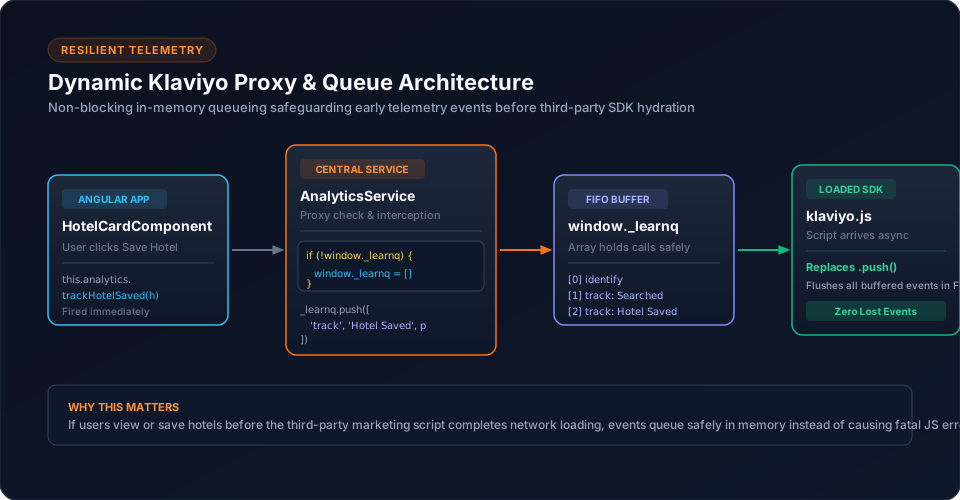
13. Secure Newsletter Subscription
Newsletter subscription is sent through the backend:
Angular
   ↓
Backend API
   ↓
Klaviyo
The private Klaviyo API credential remains server-side.
The implementation uses:
POST /User/SubscribeToklaviyo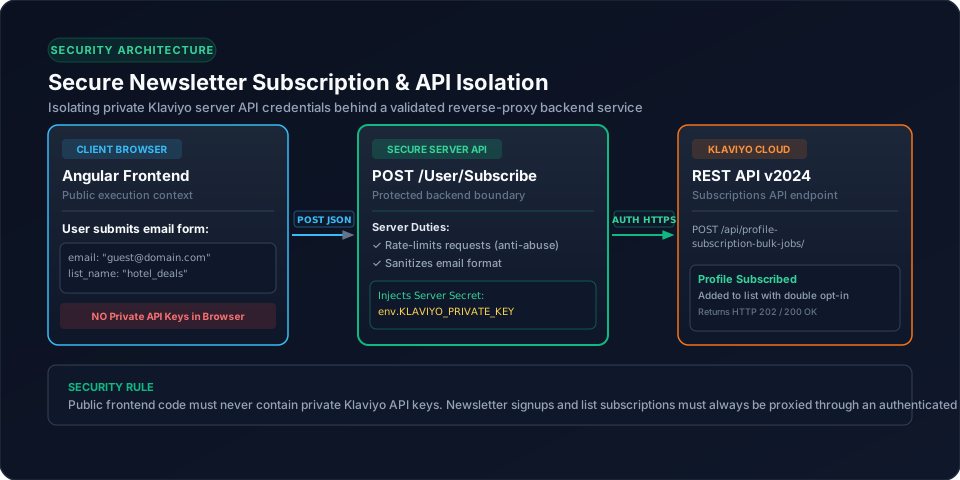
14. Testing
Test the complete lifecycle:
Account
 ↓
Search
 ↓
Hotel
 ↓
Save
 ↓
Checkout
 ↓
Booking
Verify customer identification, event names, properties, event ordering and provider loading.
15. Common Mistakes
16. Conclusion
A useful Klaviyo integration starts with a small, deliberate behaviour model.
For hotel booking applications, search, no-result searches, hotel views, saved hotels, checkout and confirmed bookings provide a meaningful lifecycle without turning analytics into an event dump.
Related Content
Need enterprise architecture consulting?
Explore our real-world case studies detailing production migrations, performance scaling, and high-throughput gateways.