
Tracking Hotel Search and Booking Events with GA4
# Tracking Hotel Search and Booking Events with GA4
A hotel booking platform produces a sequence of customer actions rather than a single conversion event.
A useful GA4 implementation should make that sequence visible:
Search
  ↓
Results
  ↓
Hotel View
  ↓
Rooms
  ↓
Selection
  ↓
Checkout
  ↓
Payment
  ↓
Purchase
This article explains how to model that funnel in an Angular SPA.
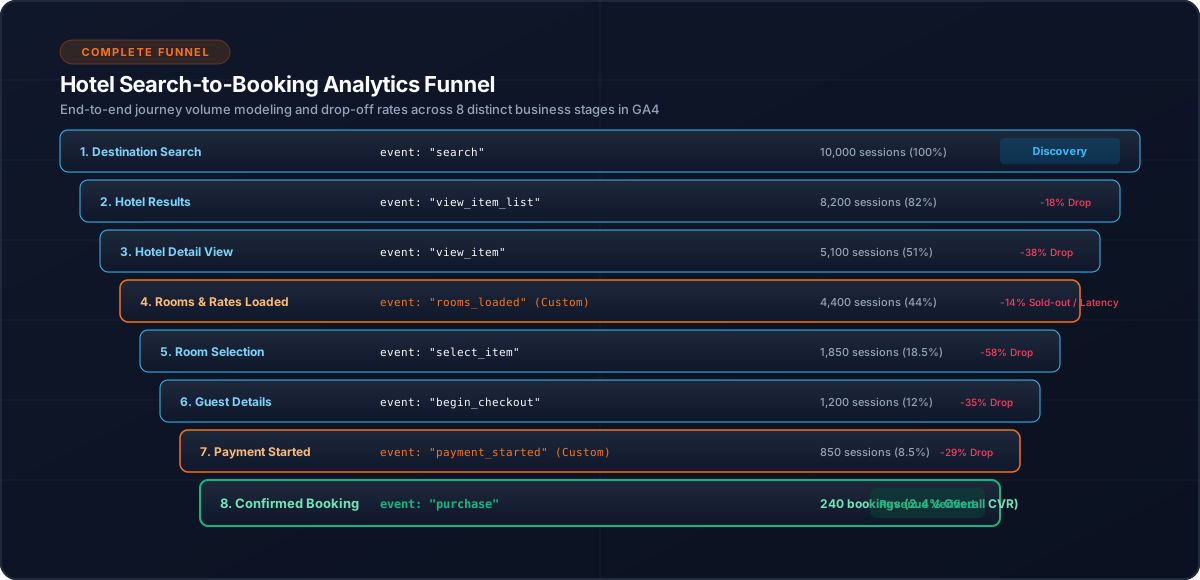
1. Start With the Business Funnel
Analytics should reflect the actual booking journey.
Each stage has a different meaning:
| Stage | Business meaning |
|---|---|
| Search | Customer intent |
| Results | Available inventory presented |
| Hotel view | Interest |
| Rooms loaded | Availability retrieved |
| Selection | Specific option chosen |
| Checkout | Booking intent |
| Payment | Payment intent |
| Purchase | Completed transaction |
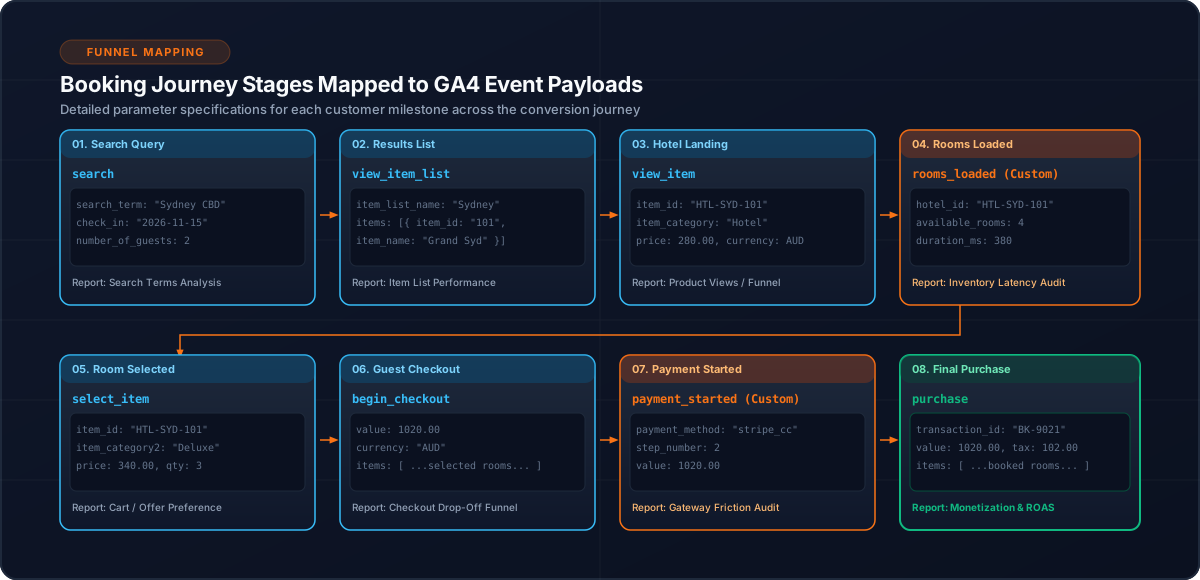
2. Search Event
The search event represents a customer submitting hotel search criteria.
this.analyticsService.trackSearch({
  destination,
  checkIn,
  checkOut,
  guests
});
Keep the event focused on meaningful search context.
3. Hotel Result Lists
Use view_item_list to represent hotel results.
Search
  ↓
Hotel result list
  ↓
view_item_list
The ecommerce item structure should use consistent hotel identifiers.
4. Hotel Detail Views
A hotel detail interaction can use view_item.
this.analyticsService.trackHotelView({
  hotelId,
  hotelName
});
Do not treat every component initialization as a hotel view. The event should correspond to a meaningful business action.
5. Rooms Loaded
Room and rate retrieval is an important intermediate stage.
Hotel View
    ↓
Load rooms/rates
    ↓
rooms_loaded
This helps distinguish interest in a hotel from successful availability retrieval.
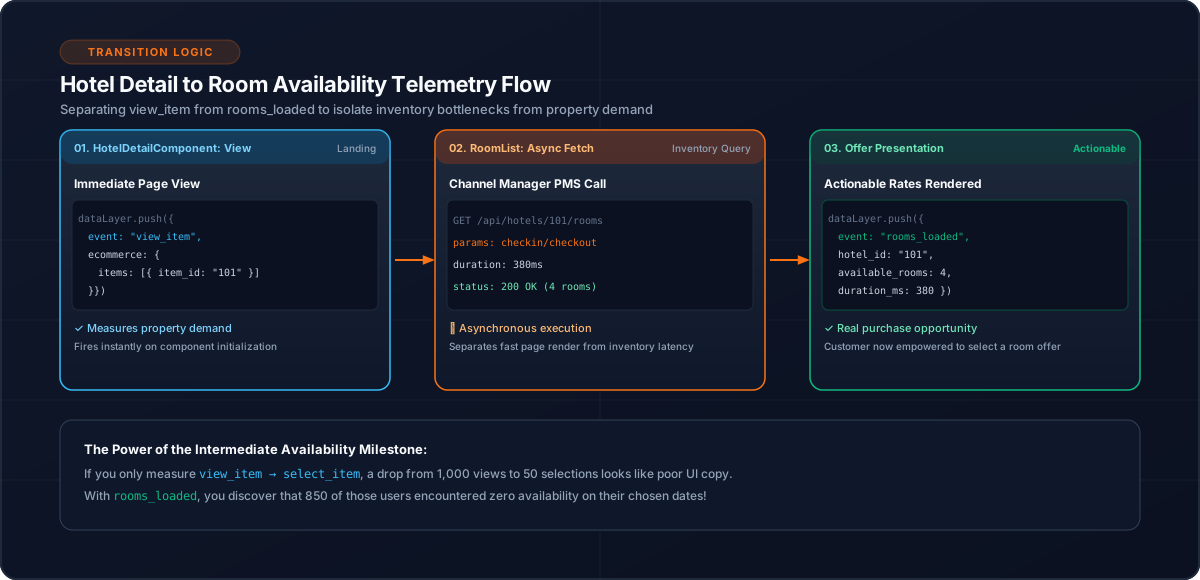
6. Selection
When a customer chooses an option:
select_itemcan represent the selection.
This event provides a bridge between browsing and booking intent.
7. Begin Checkout
The next stage is:
begin_checkoutAt this point the customer has moved beyond browsing into the booking process.
8. Payment Started
The application can separately track:
payment_startedThis provides visibility into customers reaching the payment stage.
9. Purchase
The completed booking is represented by:
purchaseThe purchase should contain a stable transaction identifier.
{
  event: 'purchase',
  ecommerce: {
    transaction_id: bookingId,
    items
  }
}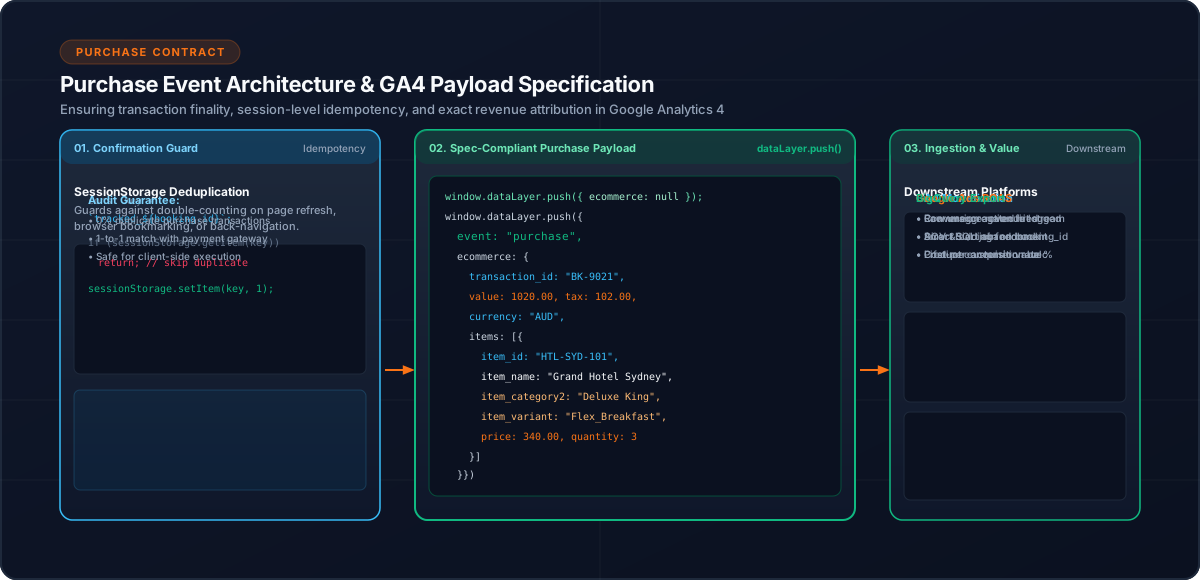
10. Prevent Duplicate Purchases
A confirmation page can be refreshed or revisited.
Use a booking ID and session-level deduplication:
const key = `purchase_tracked_${bookingId}`;

if (sessionStorage.getItem(key)) {
  return;
}
This prevents one booking from being treated as multiple application-generated purchase events.
11. Clear Ecommerce State
Before sending a new ecommerce event:
window.dataLayer.push({
  ecommerce: null
});
Then push the current event.
This helps avoid stale ecommerce state.
12. Analyze the Funnel
The resulting event sequence allows questions such as:
The analytics architecture therefore describes the customer's journey rather than only the final conversion.
13. Testing
Test the funnel from beginning to end:
Search
 ↓
Results
 ↓
Hotel
 ↓
Rooms
 ↓
Selection
 ↓
Checkout
 ↓
Payment
 ↓
Purchase
Also test abandoned journeys and repeated confirmation-page access.
14. Common Mistakes
15. Conclusion
A hotel booking funnel is naturally suited to event-based analytics.
By modeling search, results, hotel views, rooms, selection, checkout, payment and purchase as distinct events, GA4 can provide a much clearer view of the customer journey.
Related Content
Need enterprise architecture consulting?
Explore our real-world case studies detailing production migrations, performance scaling, and high-throughput gateways.