
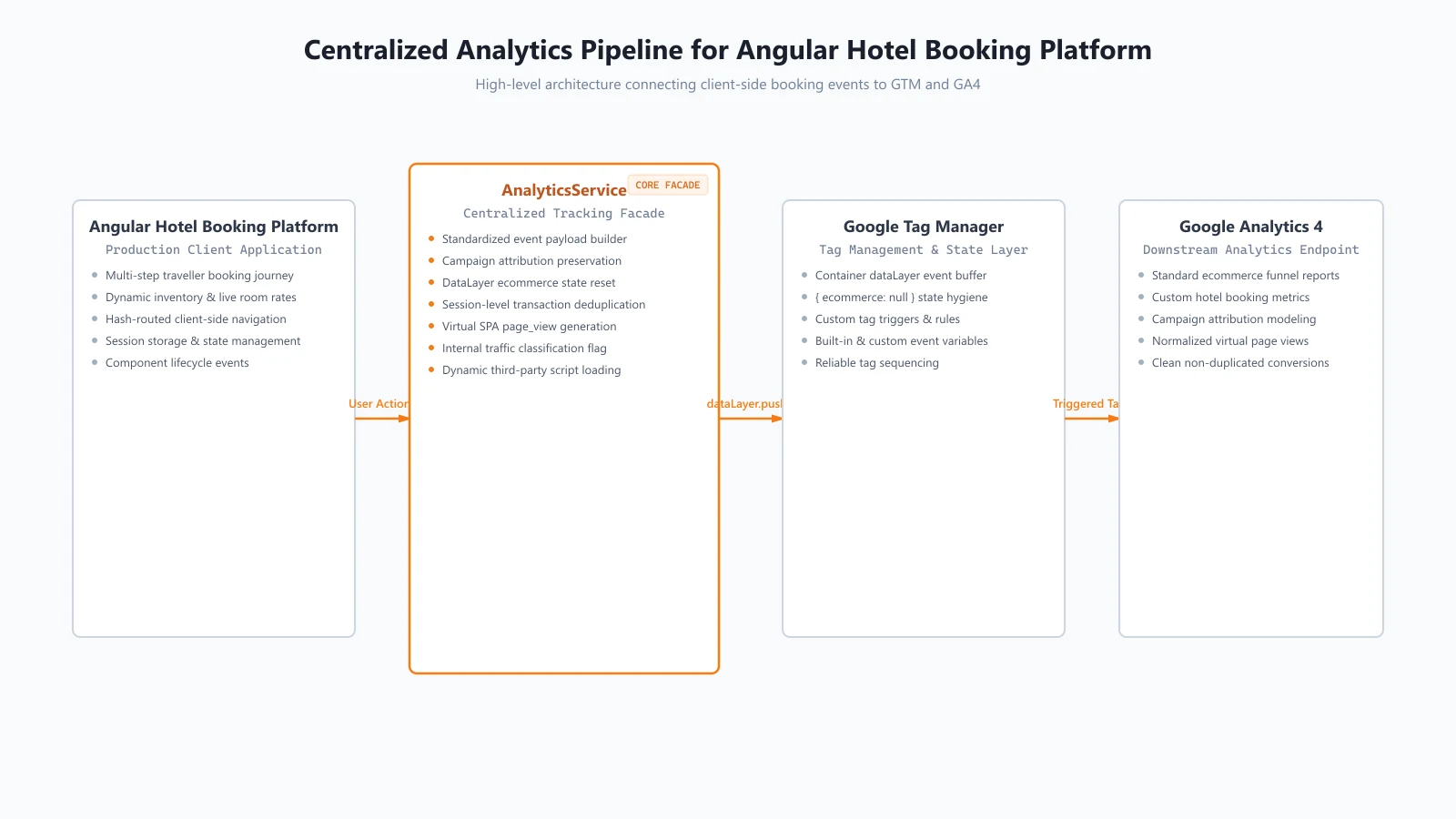
Case study: Designing a centralized Google Tag Manager and GA4 analytics architecture for a production Angular hotel search and booking application.
Introduction
Analytics in a hotel booking platform is more than tracking page views and button clicks.
A traveller can search for a destination, browse hotel results, open a property, review rooms and rates, select an option, enter checkout, start payment, and finally complete a booking. Each step produces information that needs to be represented consistently in analytics.
At the same time, a modern Angular single-page application introduces additional challenges. Navigation happens without traditional page reloads, hotel availability and pricing can arrive asynchronously, marketing parameters need to survive navigation, and ecommerce events must not accidentally reuse data from previous interactions.
The solution was to build a centralized analytics layer around Google Tag Manager (GTM) and Google Analytics 4 (GA4), rather than scattering tracking logic across individual Angular components.
The resulting architecture provides a consistent way to capture the hotel booking funnel, preserve marketing attribution, control ecommerce dataLayer state, and prevent duplicate transactional events.
1. Project Context
The application is a production Angular single-page application supporting a hotel search and booking journey.
The user journey spans several distinct stages:
Hotel Search
     ↓
Hotel Results
     ↓
Hotel Details / Rooms
     ↓
Room Selection
     ↓
Checkout
     ↓
Payment
     ↓
Booking Confirmation
Unlike a simple ecommerce storefront, hotel availability and pricing are dynamic. A hotel can be displayed before live room rates arrive, and the user’s eventual transaction depends on the selected hotel, room, dates, occupancy, currency, and booking state.
That made analytics an application-level concern rather than something that could be added as a collection of isolated tracking calls.
The implementation therefore centralized analytics responsibilities in an Angular AnalyticsService.
2. The Analytics Problems
Several problems needed to be solved together.
2.1 Tracking a multi-step hotel booking funnel
The application needed to represent meaningful stages of the traveller journey:
- A hotel search was performed.
- Hotel results were displayed.
- A hotel or room became available for viewing.
- A room/rate was selected.
- Checkout started.
- Payment was initiated.
- A booking was completed.
Each event needed an appropriate payload rather than a generic click event.
2.2 Tracking navigation in an Angular SPA
Angular navigation does not behave like a traditional multi-page website.
A route change does not necessarily reload the document, so analytics needs to explicitly observe navigation and generate virtual page-view information.
2.3 Keeping ecommerce state clean
GTM’s dataLayer is persistent during the browser session.
If an ecommerce object is pushed and later another ecommerce event is pushed without clearing the previous state, stale values can potentially remain available to downstream tags.
For a booking application, this can create particularly confusing results because the tracked hotel, room, price, or transaction can change throughout the journey.
2.4 Preventing duplicate booking transactions
A successful booking is a transaction, not simply another UI event.
Component lifecycle behaviour, re-rendering, or revisiting a confirmation state can cause the same transaction to be considered more than once.
The analytics layer therefore needed explicit session-level deduplication.
2.5 Preserving marketing attribution
A traveller may arrive through a campaign URL containing UTM parameters or advertising click identifiers.
Those parameters cannot be assumed to remain available in the original URL throughout a client-side booking journey.
The implementation captures and persists attribution information so that it can still be associated with later analytics events.
3. Designing a Centralized Analytics Layer
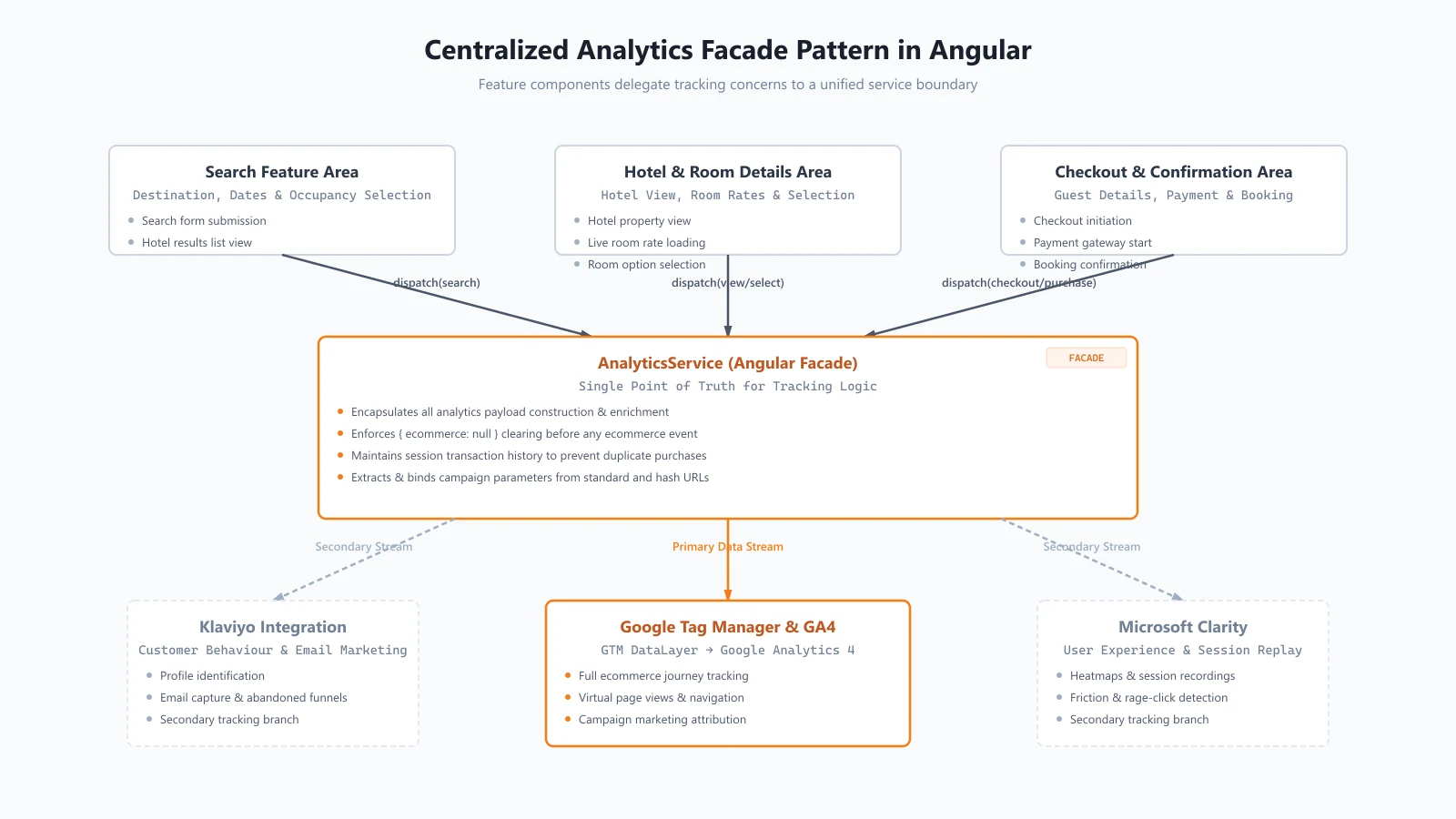
Instead of implementing GTM calls independently inside search, hotel details, checkout, and other components, the application uses a centralized analytics facade.
                    Angular Hotel Booking Application
                                  │
                 ┌────────────────┼────────────────┐
                 │                │                │
              Search         Hotel / Room       Checkout
                 │                │                │
                 └────────────────┼────────────────┘
                                  ▼
                           AnalyticsService
                                  │
                       ┌──────────┼──────────┐
                       ▼          ▼          ▼
                     GTM      Klaviyo     Clarity
                       │
                       ▼
                      GA4
For this case study, the focus is the GTM and GA4 branch.
The analytics service provides a common place to:
- construct tracking payloads
- enrich events with common information
- push events to the GTM
dataLayer - manage ecommerce state
- preserve attribution information
- identify internal traffic
- prevent duplicate transactional events
This keeps tracking concerns separate from the business logic of individual components.
4. Modeling the Hotel Booking Funnel
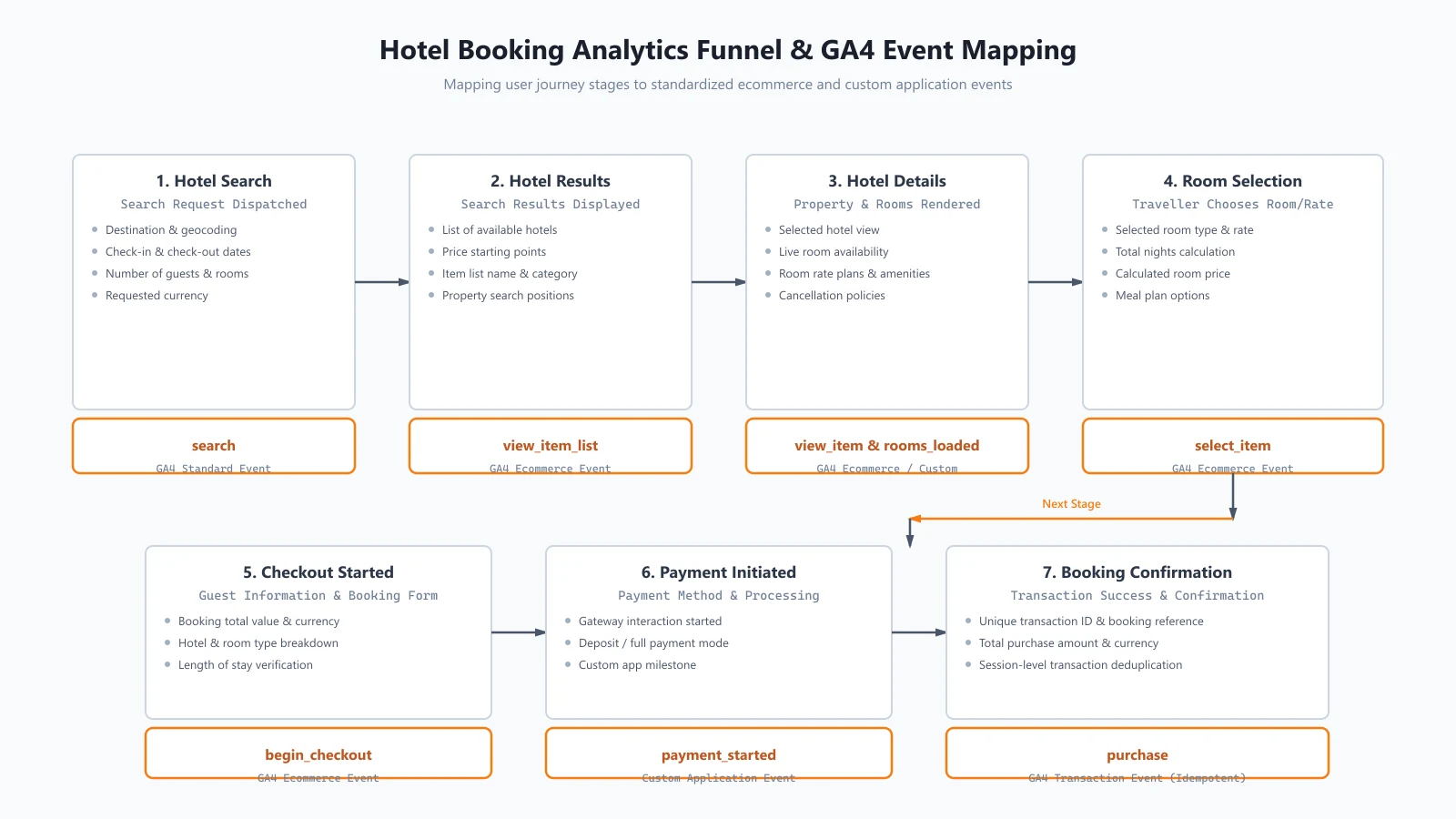
The analytics implementation maps important stages of the hotel journey to GA4 standard ecommerce events and application-specific events.
The core funnel is:
Search
  ↓
view_item_list
  ↓
view_item
  ↓
select_item
  ↓
begin_checkout
  ↓
payment_started
  ↓
purchase
This provides a more useful representation of the traveller journey than tracking only interface interactions.
Search
The search event captures information such as:
- search term
- destination
- check-in date
- check-out date
- guests
- rooms
- nights
- currency
This establishes the context in which the hotel results were requested.
view_item_list
This represents hotels presented in the search results.
The ecommerce payload includes information such as:
- currency
- item list ID
- item list name
- hotel item ID
- hotel name
- category
- position
- price
- quantity
view_item
This represents a hotel or room becoming available for detailed viewing.
select_item
This represents the traveller selecting a room or rate.
begin_checkout
This marks the transition from selecting accommodation to entering the checkout process.
The event can include booking value, currency, hotel information, room type, nights, and stay dates.
payment_started
This is a custom application event representing the point where payment processing begins.
purchase
This is the final ecommerce transaction event.
The implementation tracks information including:
- transaction ID
- booking reference
- value
- currency
- selected items
- amount paid today
- membership fee where applicable
5. Google Tag Manager DataLayer Flow
The basic flow is:
User Action
     ↓
Angular Feature
     ↓
AnalyticsService
     ↓
Build / Enrich Payload
     ↓
Clear Ecommerce State (when required)
     ↓
dataLayer.push()
     ↓
Google Tag Manager
     ↓
GA4
The important design decision is that components do not need to understand the details of the downstream analytics platform.
A hotel-search component can indicate that a search occurred. The analytics service is responsible for turning that action into the appropriate tracking payload.
This creates a single location for changes to event structure and common metadata.
6. Keeping Ecommerce DataLayer State Clean
One of the important implementation details is explicit ecommerce state clearing.
Before pushing an ecommerce event, the service pushes:
{
  ecommerce: null
}
The new ecommerce payload is then pushed separately.
Conceptually:
Previous ecommerce state
          ↓
   { ecommerce: null }
          ↓
     New ecommerce event
This prevents ecommerce information from a previous hotel, room, or transaction from being unintentionally carried into a subsequent event.
For a hotel booking funnel, this is especially important because the selected accommodation can change several times before a transaction is completed.
The approach keeps each ecommerce event explicit about the data it is intended to represent.
7. Preventing Duplicate Purchase Events
Purchase tracking requires a different level of protection from ordinary behavioural events.
The implementation uses a session-scoped identifier associated with the booking to determine whether the purchase has already been tracked.
Conceptually:
Booking Confirmation
        ↓
Check session tracking state
        ↓
   Already tracked?
      /
    Yes        No
     ↓          ↓
   Stop     Push purchase
                ↓
       Store tracking state
This protects the analytics pipeline against duplicate purchase events caused by situations such as component re-execution or page refreshes.
The important principle is that the booking transaction is treated as an idempotent analytics operation within the session.
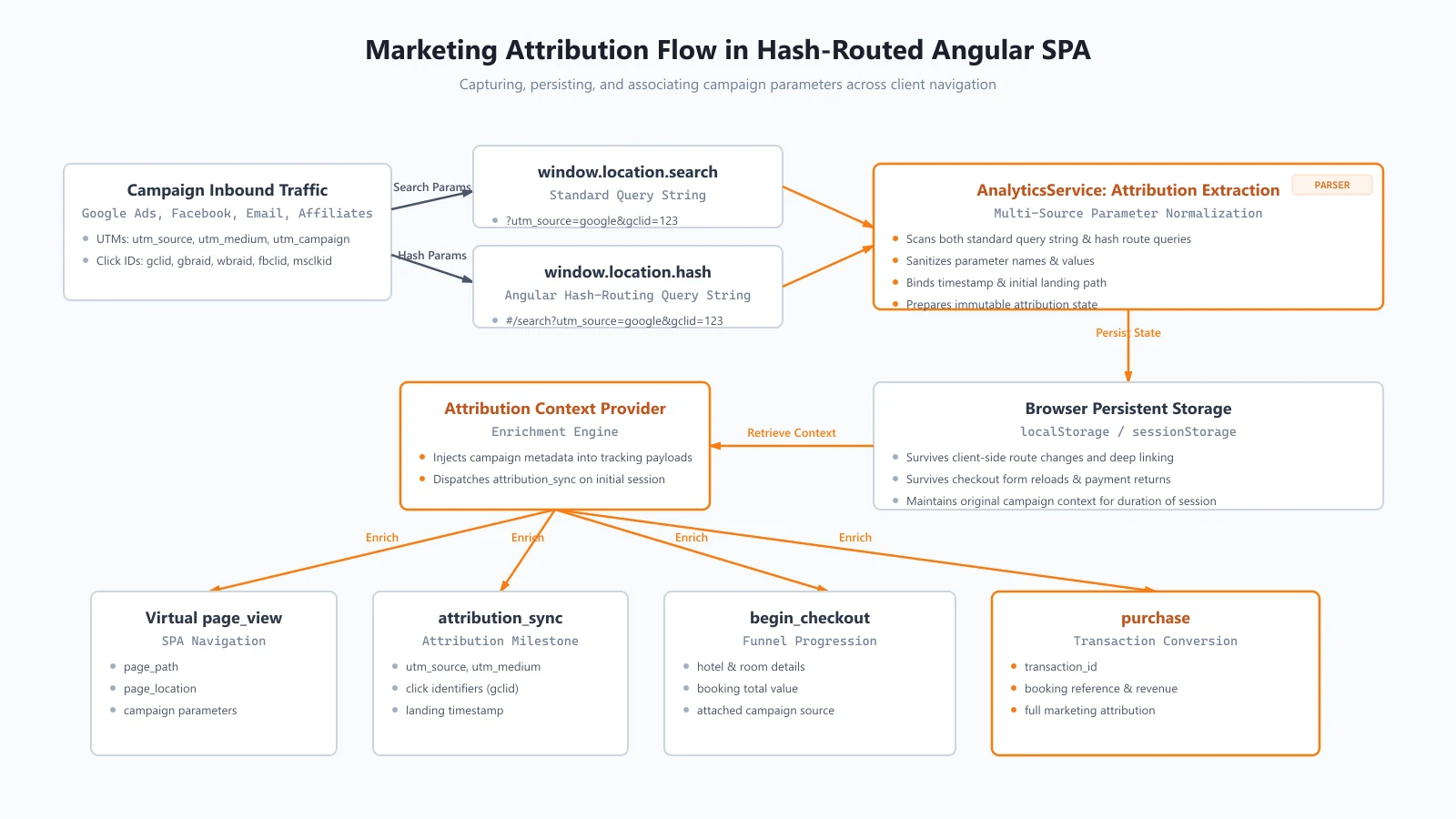
8. Preserving Marketing Attribution
A hotel booking journey can begin from a campaign URL and end several navigation steps later.
The implementation captures attribution parameters including:
utm_sourceutm_mediumutm_campaigngclidgbraidwbraidmsclkidfbclid
These values are persisted in browser storage and can later be incorporated into analytics processing.
Why Angular hash routing matters
The application uses hash-based routing.
Depending on how a campaign URL is constructed, query parameters can appear in:
window.location.searchor within the query portion of:
window.location.hashThe analytics implementation checks both locations.
The resulting flow is:
Campaign URL
     │
     ├── Standard query parameters
     │
     └── Hash-route query parameters
                │
                ▼
        AnalyticsService
                │
                ▼
          Persistent Storage
                │
                ▼
        Attribution Context
                │
                ▼
         Analytics Events
This prevents client-side routing from becoming an accidental boundary that loses campaign attribution.
9. Tracking SPA Page Views
Traditional websites can rely on document loads for page-view tracking.
An Angular SPA needs explicit navigation handling.
The implementation listens to Angular router navigation completion and creates page-view information containing values such as:
page_pathpage_locationpage_title
The tracked URL is normalized so that the analytics representation does not simply expose the application’s hash-routing syntax.
This gives GA4 a clearer representation of the virtual pages users move through during the hotel booking journey.
10. Identifying Internal Traffic
Production applications can have internal users who browse and test the system.
Counting that activity as ordinary customer behaviour can make analytics harder to interpret.
The analytics layer checks user email information against an internal-user classification and adds:
is_internal_user: true | falseto the relevant analytics data.
This provides a consistent way to distinguish internal activity without requiring every downstream analytics consumer to independently implement the classification logic.
The actual internal email/domain whitelist is intentionally not exposed in this case study.
11. Dynamic Tracker Loading
Third-party tracking scripts are loaded dynamically by the analytics layer.
The implementation includes protections such as:
- browser-environment checks
- duplicate script ID guards
- runtime script injection
This keeps third-party tracking initialization centralized and avoids blindly adding the same external script multiple times.
The broader design also provides a clean boundary between application startup and third-party analytics availability.
12. Event Architecture in Practice
The resulting event catalogue represents the hotel booking journey at several levels.
| Event | Purpose |
|---|---|
page_view |
Track Angular SPA navigation |
sign_up |
Track account creation |
login |
Track authentication |
search |
Track hotel search context |
view_item_list |
Track hotels presented in search results |
view_item |
Track hotel/room detail views |
rooms_loaded |
Track arrival of room-rate information |
select_item |
Track room/rate selection |
begin_checkout |
Track checkout initiation |
payment_started |
Track payment initiation |
purchase |
Track completed booking |
membership |
Track membership transaction |
attribution_sync |
Synchronize marketing attribution context |
The important characteristic is that the events describe meaningful application states and business actions rather than an arbitrary collection of UI clicks.
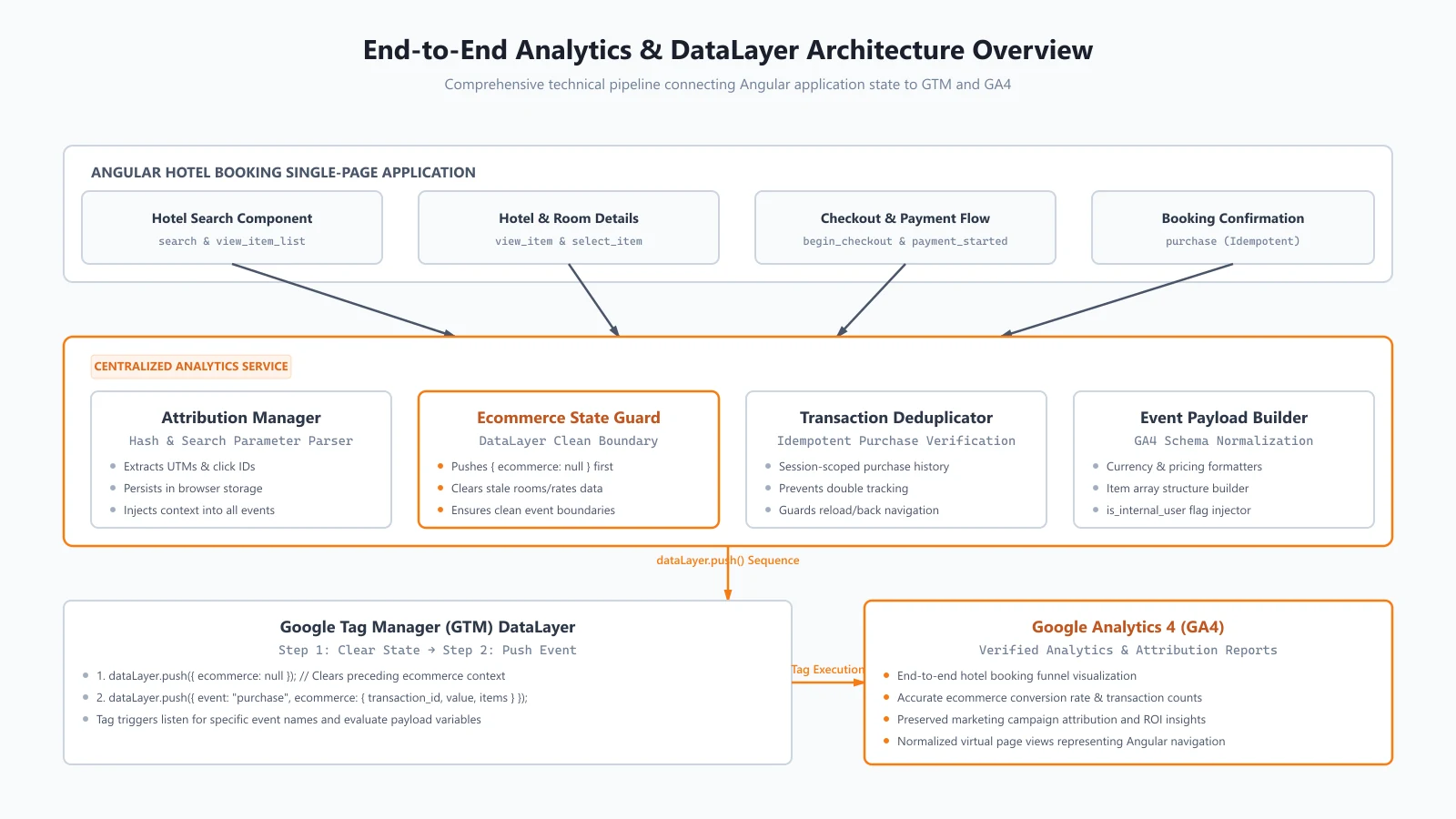
13. Architecture Overview
The complete GTM/GA4 flow can be summarized as:
                       Hotel Booking SPA
                              │
             ┌────────────────┼────────────────┐
             │                │                │
          Search          Hotel / Room       Checkout
             │                │                │
             └────────────────┼────────────────┘
                              ▼
                       AnalyticsService
                              │
                    ┌─────────┴─────────┐
                    │                   │
                    ▼                   ▼
               Attribution          Event Builder
                    │                   │
                    └─────────┬─────────┘
                              ▼
                         GTM DataLayer
                              │
                              ▼
                             GA4
The architecture gives the application a single analytics boundary.
Feature code is responsible for knowing when something meaningful happened. The analytics layer is responsible for deciding how that event should be represented and delivered.
14. Key Engineering Decisions
Centralize analytics logic
Keeping analytics in a dedicated service avoids duplicating event construction and platform-specific logic across Angular components.
Treat ecommerce state explicitly
Clearing the ecommerce object before a new ecommerce event makes the event boundary explicit and reduces the risk of stale data.
Treat transactions differently from behavioural events
A booking purchase is a business transaction. Session-level deduplication is therefore appropriate.
Preserve attribution independently of navigation
Campaign information should survive the SPA lifecycle rather than depending on the initial URL remaining unchanged.
Design events around the hotel booking journey
The most useful analytics model reflects how travellers actually move through the platform: searching, discovering hotels, selecting rooms, checking out, paying, and booking.
15. What This Architecture Provides
The implementation provides several qualitative benefits:
- Consistent measurement across the hotel booking funnel
- A centralized place to maintain analytics logic
- Cleaner GA4 ecommerce event state
- Reduced risk of duplicate purchase reporting
- Better preservation of campaign attribution
- Explicit SPA page-view tracking
- Consistent identification of internal traffic
- A reusable foundation for additional analytics destinations
No specific conversion, revenue, latency, attribution, or ROI improvement is claimed here because verified production metrics were not available as part of this implementation review.
16. Lessons Learned
Analytics becomes an architectural concern as the application grows
A small application can get away with tracking calls inside components. A multi-step booking platform benefits from a dedicated analytics abstraction.
Ecommerce events need state discipline
The GTM dataLayer should not be treated as a disposable object. Its state persists, so ecommerce events need deliberate boundaries.
Booking transactions need idempotency
A successful booking should not become multiple purchases simply because the UI is re-rendered or a confirmation page is revisited.
SPA routing changes attribution assumptions
Hash routing and client-side navigation can change where query parameters appear and when they remain accessible.
Event names should describe meaningful business behaviour
A useful analytics model tells the story of the traveller journey rather than simply counting interface interactions.
17. Conclusion
Building analytics for a hotel booking platform is not simply a matter of installing Google Tag Manager and adding a few tracking calls.
The difficult part is creating a reliable event architecture that understands a dynamic booking journey.
The centralized Angular analytics layer provides that boundary. It connects hotel search, hotel discovery, room selection, checkout, payment, and booking confirmation to GTM and GA4 while also addressing practical SPA concerns such as navigation tracking, attribution persistence, ecommerce state management, and duplicate transaction prevention.
The result is an analytics architecture designed around the actual behaviour of a hotel booking application rather than around isolated UI interactions.
Related Content
Klaviyo Customer Behaviour Tracking
Integrating Customer Behaviour Tracking with Klaviyo in an Angular Hotel Booking Platform
Supporting Technical Article
GA4 Ecommerce Tracking in Angular SPAs: Events, DataLayer State and Duplicate Transactions (Coming soon)
Similar case studies
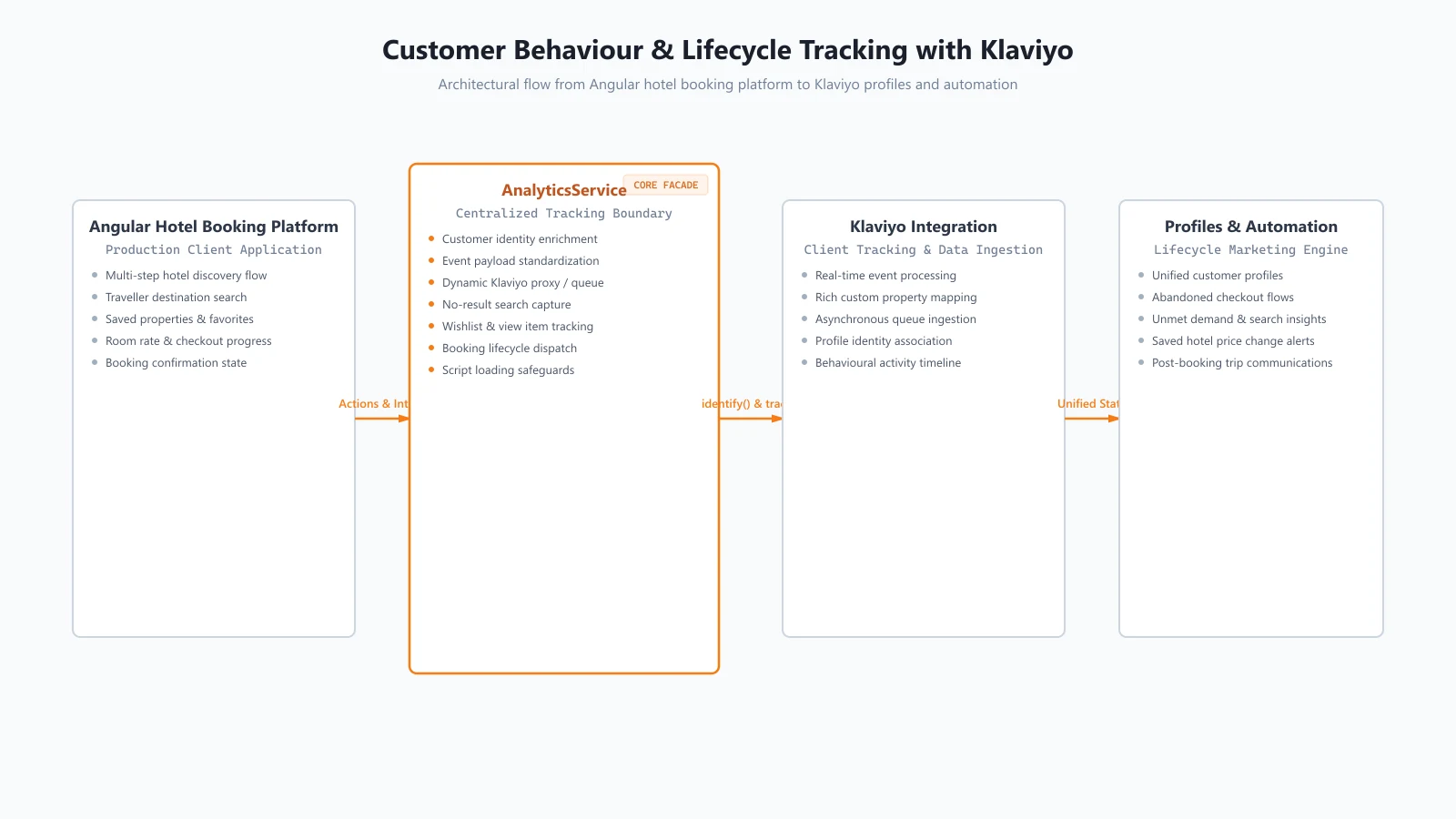
Integrating Customer Behaviour Tracking with Klaviyo in an Angular Hotel Booking Platform
Learn how a centralized Klaviyo integration captures hotel search, hotel viewing, checkout, and booking behaviour in an Angular hotel booking platform.
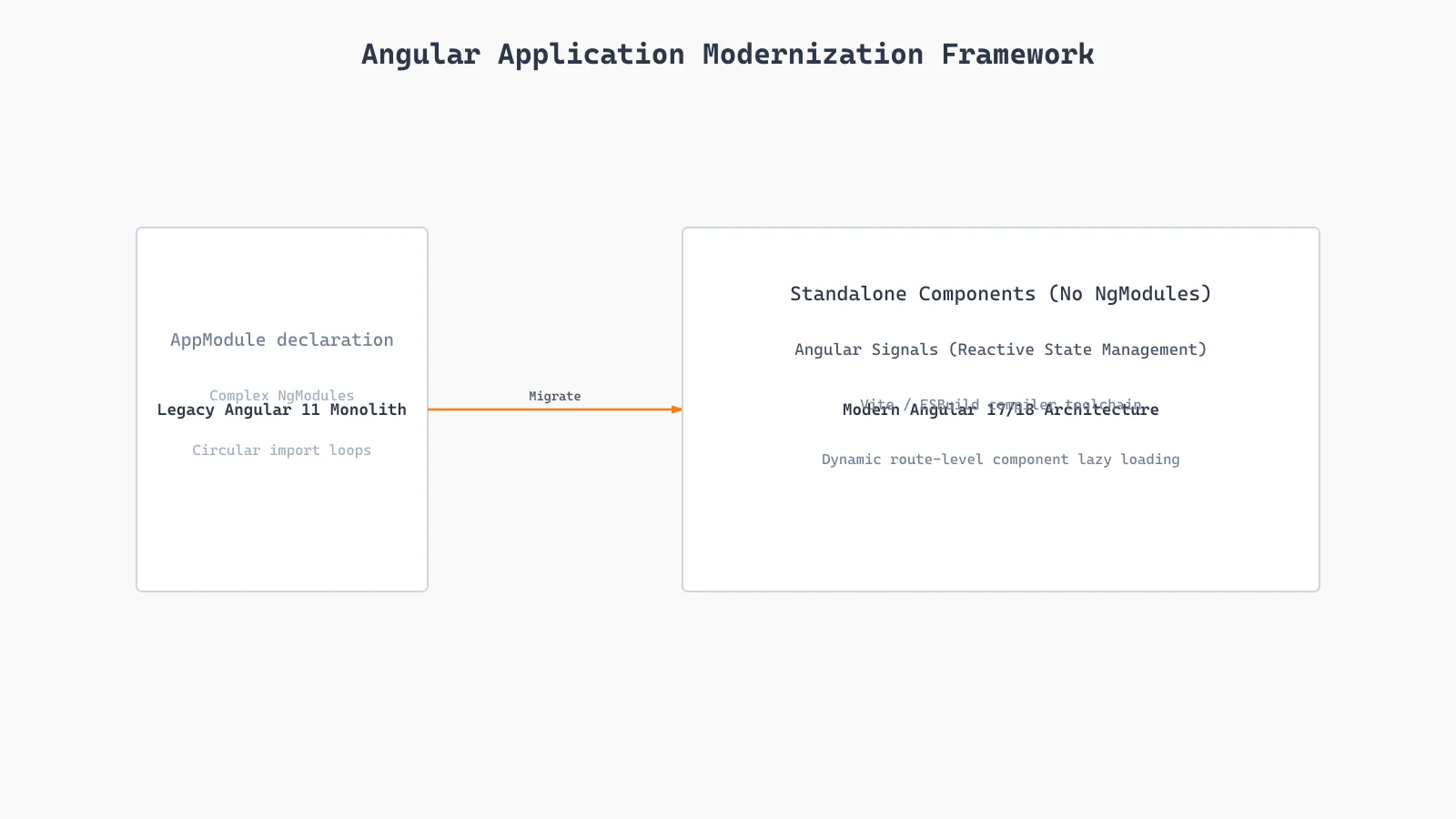
Enterprise Angular Application Modernization | Rajdip Khavad
Learn how an enterprise application was upgraded from Angular 11 to Angular 17/18, migrating to Standalone Components and Signals.
About Rajdip Khavad
Rajdip Khavad is an Angular and ASP.NET Core/.NET developer specializing in enterprise applications, APIs, application modernization and performance-focused engineering. On this project, his focus was Google Tag Manager dataLayer state management, GA4 ecommerce tracking and attribution preservation.