
GA4 Ecommerce Tracking: view_item, select_item and purchase Explained
# GA4 Ecommerce Tracking: view_item, select_item and purchase Explained
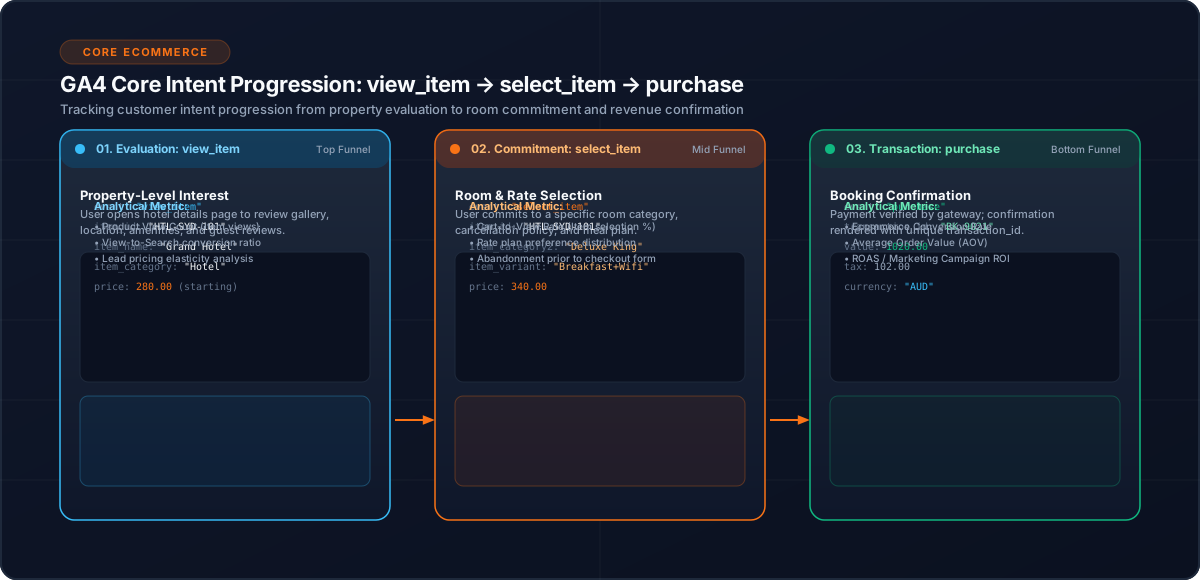
GA4 ecommerce events are most useful when each event represents a clear stage of customer intent.
In a hotel booking application, three particularly important stages are:
Hotel Viewed
     ↓
Option Selected
     ↓
Booking Completed
These can be represented with view_item, select_item and purchase.
1. What Each Event Means
| Event | Business meaning |
|---|---|
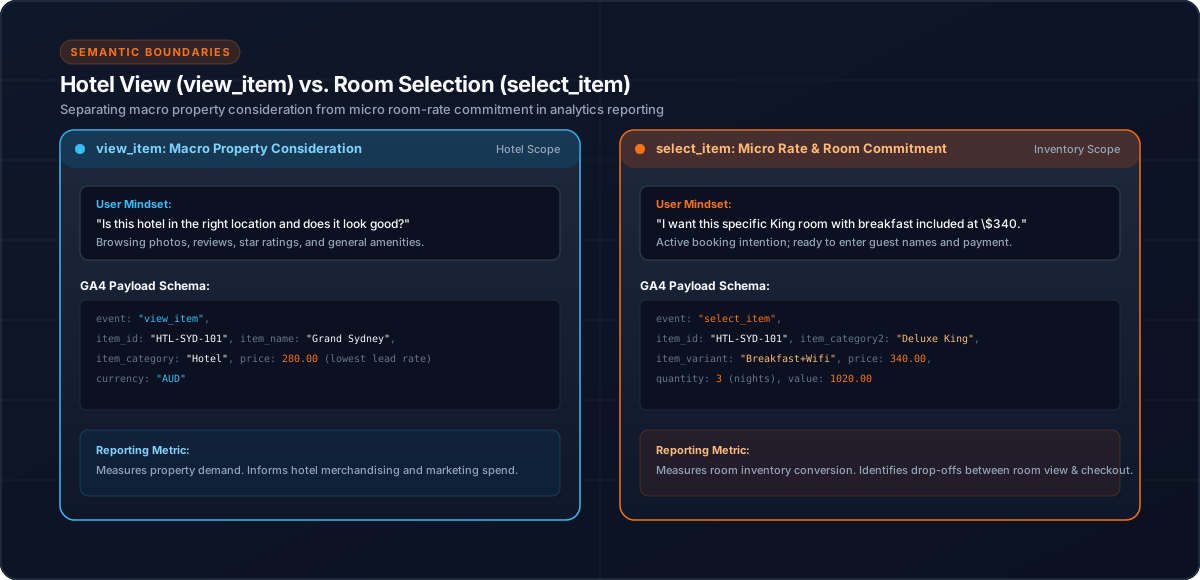
view_item | A hotel or accommodation option was meaningfully viewed |
select_item | A specific hotel, room or rate was selected |
purchase | A booking was completed |
The events should describe business actions rather than Angular component lifecycle events.
2. `view_item`
A hotel detail interaction can use:
this.analyticsService.trackHotelView({
  hotelId,
  hotelName
});
The analytics layer can map that application model to a GA4 ecommerce item:
{
  event: 'view_item',
  ecommerce: {
    items: [{
      item_id: hotelId,
      item_name: hotelName
    }]
  }
}
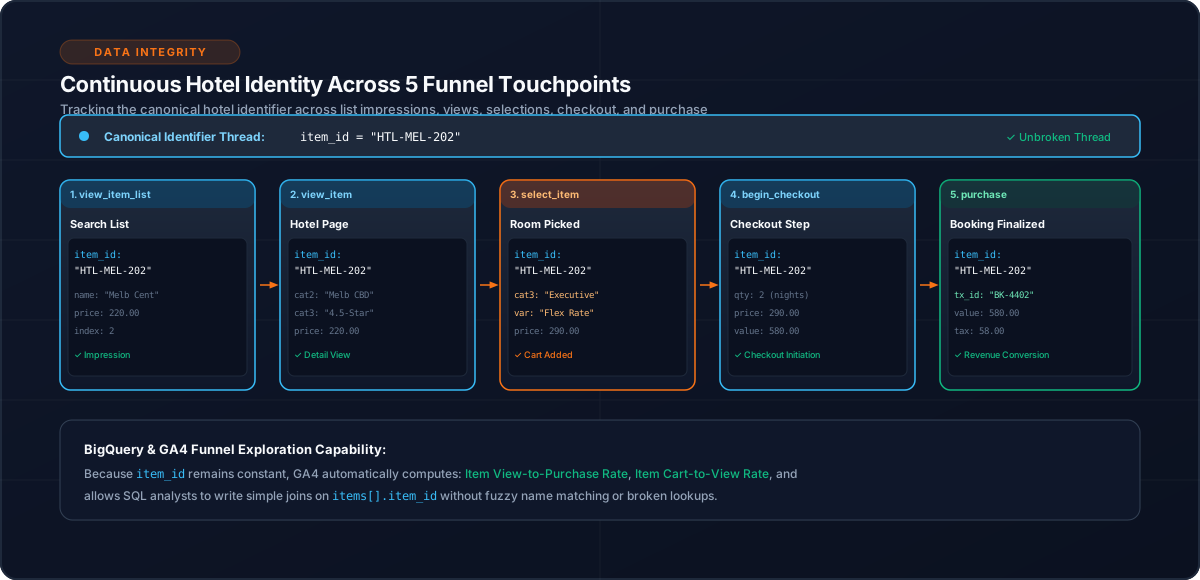
The identifier should remain consistent with the corresponding result-list and later ecommerce events.
3. `select_item`
Selection represents stronger intent than simply viewing a hotel.
view_item
    ↓
Customer evaluates options
    ↓
select_item
For a hotel booking flow, selection may relate to a room or rate.
Keep the payload focused on the selected item and relevant context rather than sending the entire application object.
4. `purchase`
Purchase is the transactional event and deserves special handling.
{
  event: 'purchase',
  ecommerce: {
    transaction_id: bookingId,
    items
  }
}
The booking ID provides a stable transaction identity.
Additional ecommerce properties should follow the application's analytics contract.
5. Keep Ecommerce State Clean
Before pushing a new ecommerce event:
window.dataLayer.push({
  ecommerce: null
});
Then push the current event.
This creates a clean boundary between ecommerce payloads and helps prevent stale state from a previous interaction.
6. Keep Item Identity Consistent
A useful progression is:
view_item_list
      ↓
view_item
      ↓
select_item
      ↓
begin_checkout
      ↓
purchase
The same hotel should not unexpectedly change identity between events.
Prefer explicit mapping:
items: [{
  item_id: hotel.id,
  item_name: hotel.name
}]
instead of passing an entire domain object.
7. Protect the Purchase Event
Confirmation pages can be refreshed or revisited.
The implementation uses session-level deduplication keyed by booking ID:
const key = `purchase_tracked_${bookingId}`;

if (sessionStorage.getItem(key)) {
  return;
}
This makes application-generated purchase tracking idempotent within the browser session.
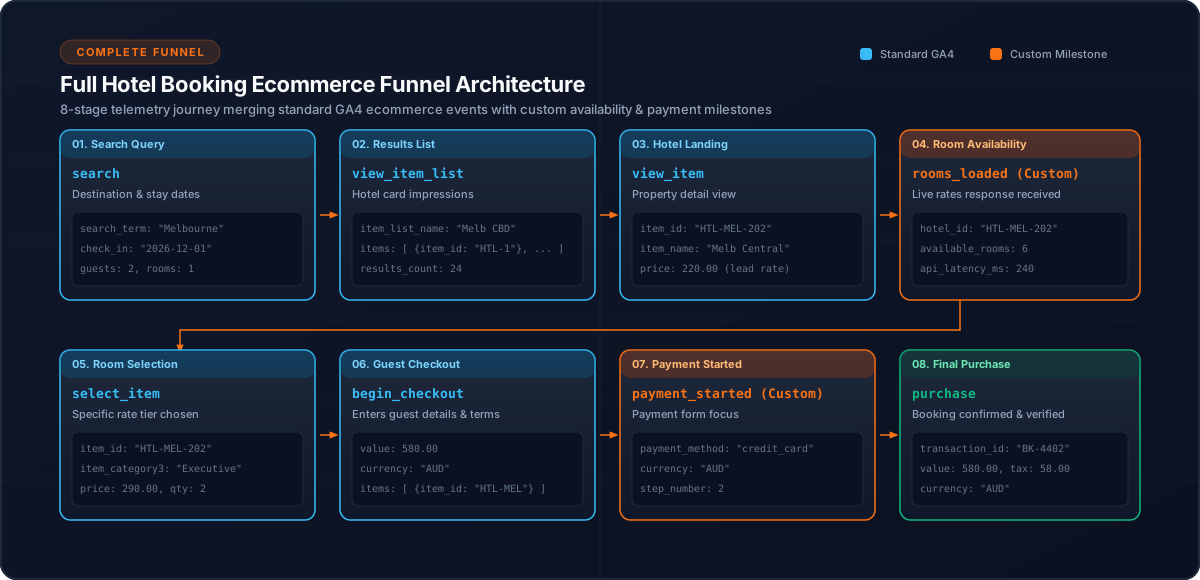
8. A Practical Hotel Funnel
Search
  ↓
view_item_list
  ↓
view_item
  ↓
select_item
  ↓
begin_checkout
  ↓
payment_started
  ↓
purchase
This lets analytics distinguish browsing, selection, checkout and completed booking.
9. Testing Checklist
Test:
Conclusion
view_item, select_item and purchase should not be treated as isolated tracking calls. Together they describe a progression from interest to selection to completed transaction.
A centralized Angular analytics layer makes that progression easier to keep consistent and test.
Related Content
Need enterprise architecture consulting?
Explore our real-world case studies detailing production migrations, performance scaling, and high-throughput gateways.