
Debugging Google Analytics Events in Angular SPAs
# Debugging Google Analytics Events in Angular SPAs
Analytics bugs are often difficult to diagnose because an event can fail at several different layers.
A hotel booking event might be generated correctly by Angular but fail to trigger the expected GTM tag. Alternatively, GTM may receive the event while the ecommerce payload is incorrect.
A useful debugging process follows the entire chain.
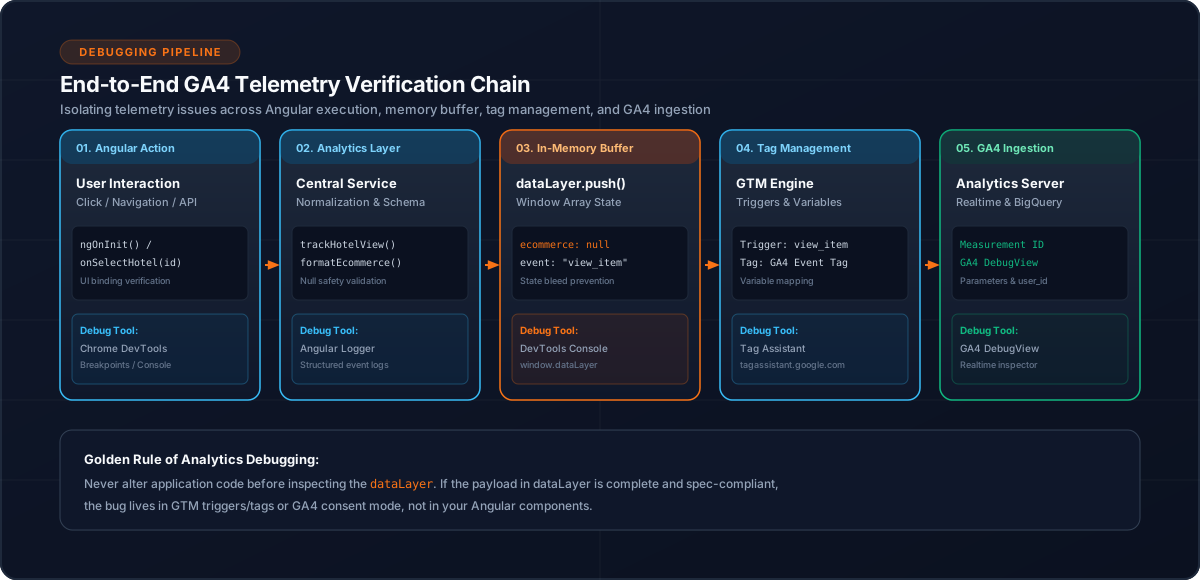
1. Understand the Tracking Chain
The basic path is:
User action
    ↓
Angular component
    ↓
AnalyticsService
    ↓
dataLayer
    ↓
Google Tag Manager
    ↓
GA4
Debug each layer separately.
2. Verify the Business Event
Start with the application.
For example:
this.analyticsService.trackHotelView({
  hotelId,
  hotelName
});
Confirm that the method is called only when the intended business action occurs.
Do not begin by assuming GA4 is the problem.
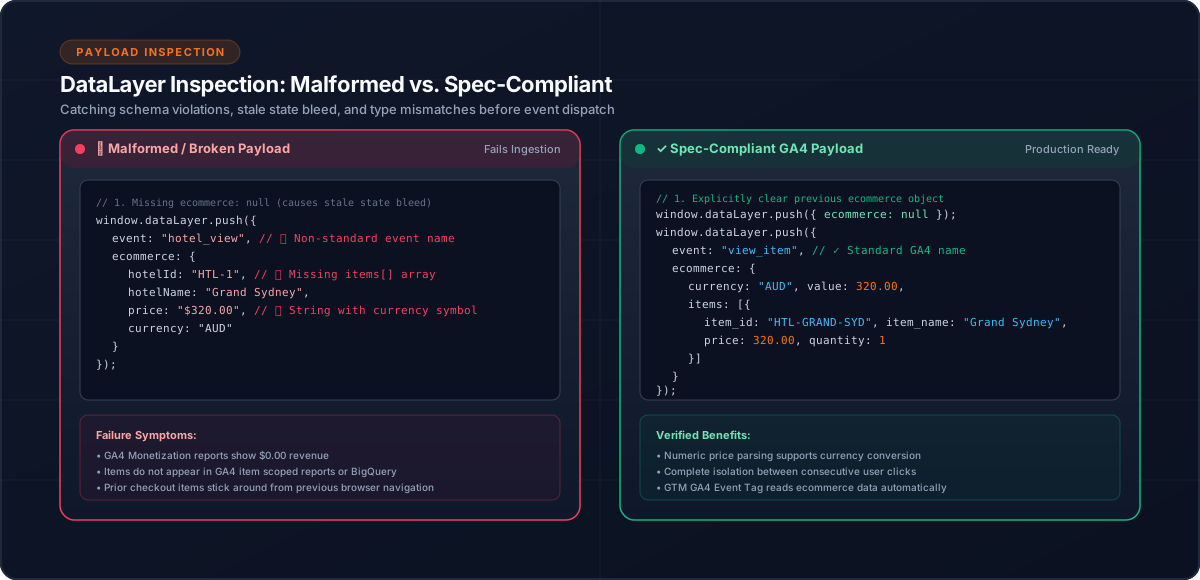
3. Inspect the DataLayer
The next question is:
Did Angular push the expected event?
For example:
{
  event: 'view_item',
  ecommerce: {
    items: [...]
  }
}
Check:
4. Check Ecommerce State
If ecommerce events are involved, inspect whether previous ecommerce data remains in the dataLayer.
A clean pattern is:
window.dataLayer.push({
  ecommerce: null
});

window.dataLayer.push({
  event: 'view_item',
  ecommerce: {
    items
  }
});
This creates a clear boundary between ecommerce payloads.
5. Verify GTM Trigger Matching
Once the dataLayer is correct, verify that GTM recognizes the event.
Conceptually:
dataLayer event
      ↓
GTM trigger
      ↓
Tag fires
If the event exists in the dataLayer but the tag does not fire, investigate the trigger configuration rather than Angular code.
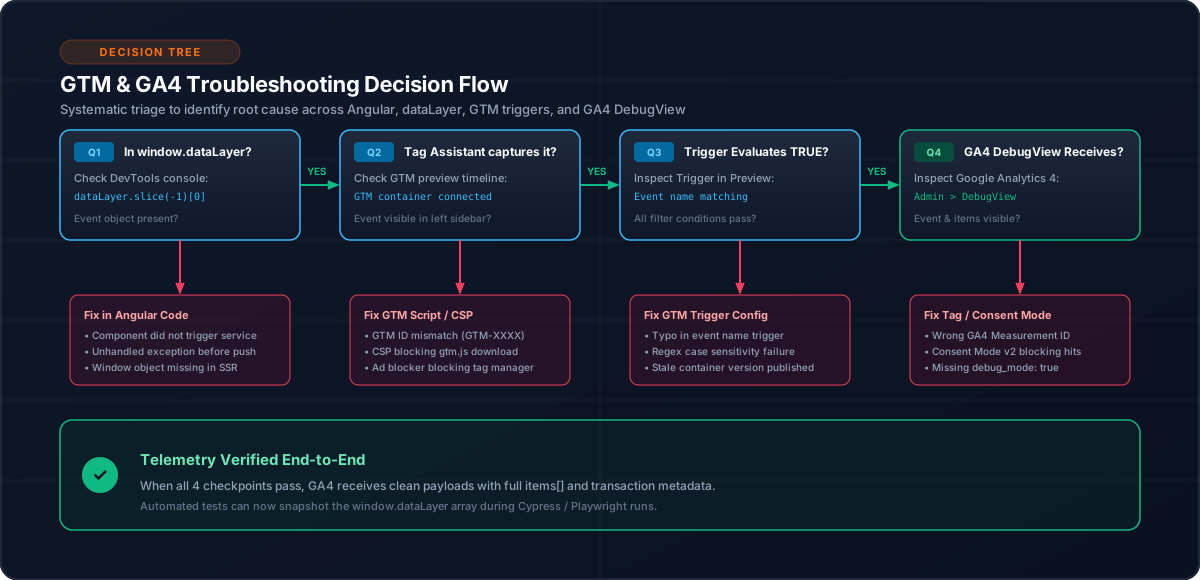
6. Verify the Tag Payload
A tag can fire successfully while still sending incorrect information.
For ecommerce events inspect:
7. Debug Purchase Events Differently
Purchase events require additional checks.
Verify:
Booking completed
      ↓
booking ID available
      ↓
deduplication check
      ↓
purchase pushed
Then repeat the confirmation-page scenario.
The same booking should not repeatedly create a new application-level purchase event.
8. Debug Attribution
For campaign tracking verify:
Initial URL
    ↓
Attribution captured
    ↓
Stored
    ↓
Navigation
    ↓
Purchase
Test both normal query parameters and hash-route parameters.
9. Debug SPA Page Views
Angular navigation does not equal browser page loading.
Test:
Route A
  ↓
Route B
  ↓
Route C
and confirm that the intended page-view events occur.
10. Use a Layer-by-Layer Checklist
When an event is missing:
[ ] User action occurred
[ ] Angular tracking method executed
[ ] dataLayer event exists
[ ] Event payload is correct
[ ] GTM trigger matches
[ ] GTM tag fires
[ ] GA4 receives expected data
This prevents random changes across the codebase.
11. Common Debugging Mistakes
12. Conclusion
Analytics debugging becomes much easier when treated as a pipeline.
For an Angular hotel booking application, verify each layer in order:
Angular
 ↓
AnalyticsService
 ↓
dataLayer
 ↓
GTM
 ↓
GA4
This approach reduces guesswork and makes analytics failures easier to isolate.
Related Content
Need enterprise architecture consulting?
Explore our real-world case studies detailing production migrations, performance scaling, and high-throughput gateways.