
How to Track SPA Navigation and Page Views in Angular
# How to Track SPA Navigation and Page Views in Angular
Single-page applications change views without performing a traditional browser page reload.
That is good for application performance and user experience, but it changes how analytics page views should be implemented.
For a hotel booking platform, users may move through:
/hotels
   ↓
/hotel/123
   ↓
/hotel/123/rooms
   ↓
/checkout
   ↓
/confirmation
The browser document can remain loaded while the Angular route changes.

1. Browser Page Load vs SPA Navigation
Traditional websites often follow:
Request page
   ↓
Browser loads document
   ↓
Page view
An Angular SPA behaves more like:
Application loaded
   ↓
Angular route changes
   ↓
View changes
Therefore, page-view tracking needs to understand Angular navigation.
2. Why This Matters
If analytics only observes the initial document load, a user can visit multiple application views while analytics records only one page.
For example:
Initial load → /hotels
Angular navigation → /hotel/123
Angular navigation → /checkout
Angular navigation → /confirmation
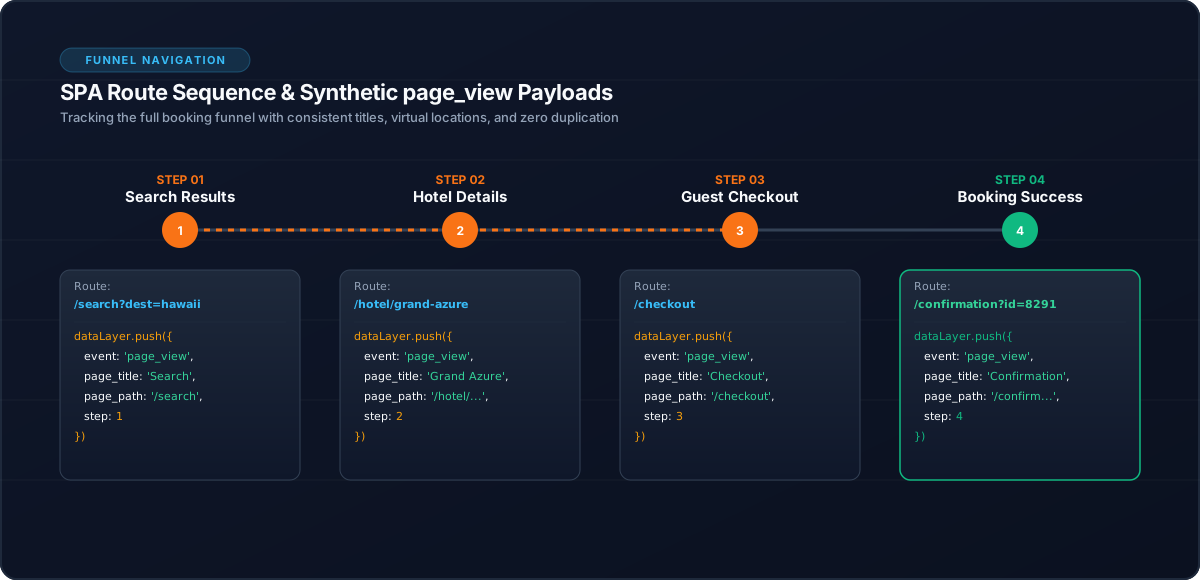
Each meaningful route transition may need its own page-view handling.
3. Track Meaningful Route Changes
The analytics layer can listen to Angular navigation and generate the appropriate page-view event.
Conceptually:
Angular Router
      ↓
Navigation completed
      ↓
AnalyticsService
      ↓
page_view
The exact implementation should be centralized rather than duplicated across page components.
4. Avoid Tracking Every Router Event
Angular navigation produces multiple router lifecycle events.
Do not treat every router event as a page view.
The analytics implementation should identify the appropriate completed navigation boundary.
5. Route Changes and Business Events Are Different
A route change does not necessarily mean a business event occurred.
For example:
/hotel/123may generate:
page_viewand, when the application confirms that the hotel is actually being viewed:
view_itemThese events answer different questions.
| Event | Question |
|---|---|
page_view | Which application view was visited? |
view_item | Which hotel was viewed? |
6. Hotel Booking Example
A customer might navigate:
Search
  ↓
Hotel detail
  ↓
Rooms
  ↓
Checkout
Analytics can represent:
page_view
view_item
rooms_loaded
begin_checkout
Each event has a distinct purpose.
7. Hash-Based Angular Routes
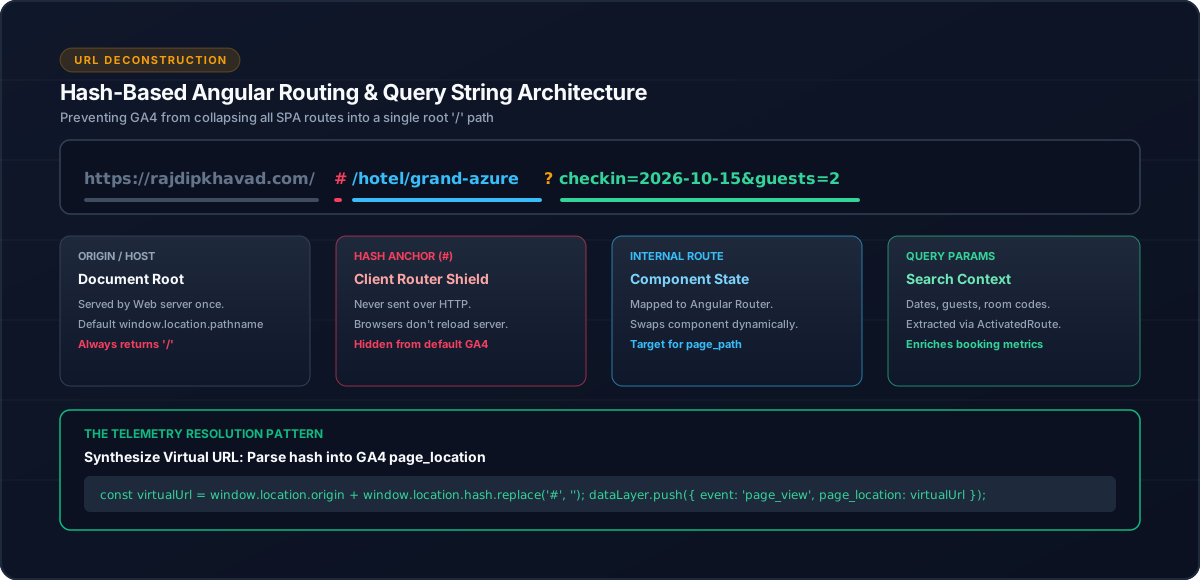
Applications using hash routing can have URLs such as:
https://example.com/#/hotel/123Analytics code should understand the application's routing strategy when constructing page information and attribution data.
This is especially important when query parameters also appear inside the hash.
8. Centralize Page-View Tracking
A centralized service can expose a page-view method:
this.analyticsService.trackPageView(route);This keeps provider-specific logic outside route components.
9. Test Navigation
Test:
Initial page load
      ↓
Route A → Route B
      ↓
Route B → Route C
      ↓
Back/forward navigation
      ↓
Refresh
Verify that page views are neither missing nor unintentionally duplicated.
10. Common Mistakes
11. Conclusion
Reliable SPA page-view tracking requires understanding the difference between browser document loads and Angular route navigation.
A centralized analytics service can provide one consistent boundary for page-view tracking while keeping route handling separate from ecommerce and customer-behaviour events.
Related Content
Need enterprise architecture consulting?
Explore our real-world case studies detailing production migrations, performance scaling, and high-throughput gateways.