
Building a Reliable Analytics Layer for Angular Applications
# Building a Reliable Analytics Layer for Angular Applications
Analytics integrations often begin as small pieces of code:
window.dataLayer.push(...);or:
klaviyo.track(...);As the application grows, these calls can spread across components and become difficult to reason about.
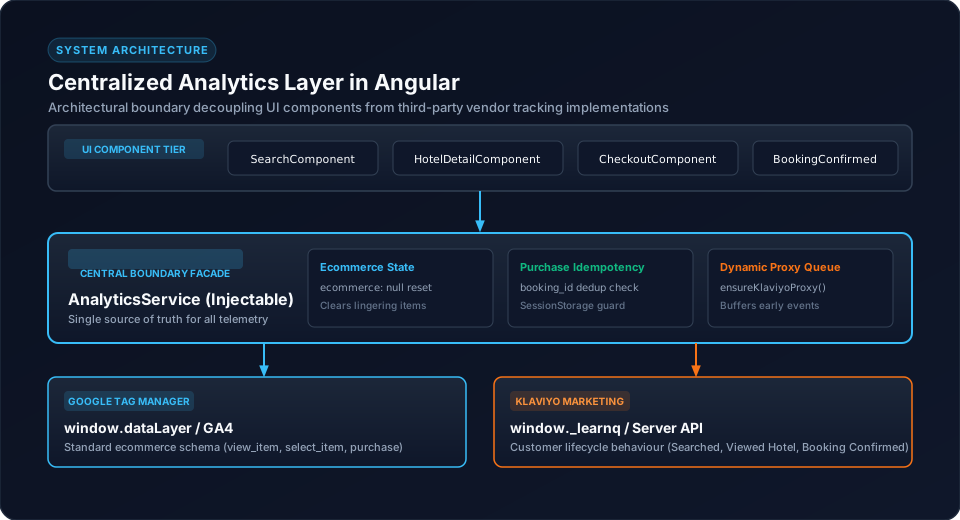
A reliable analytics layer creates a stable boundary between application behaviour and external analytics providers.
1. The Core Problem
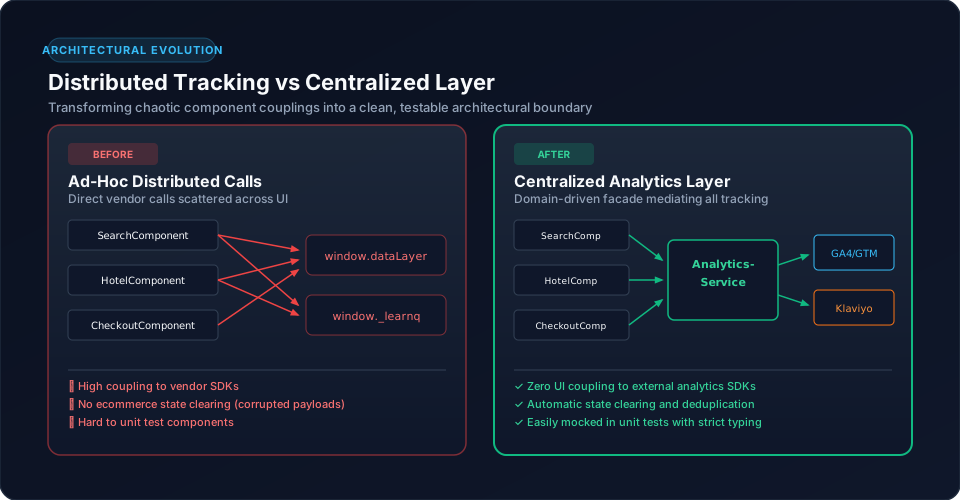
Without centralization:
SearchComponent → GTM
SearchComponent → Klaviyo
HotelComponent → GTM
HotelComponent → Klaviyo
CheckoutComponent → GTM
CheckoutComponent → Klaviyo
The application becomes tightly coupled to provider implementation.
2. Centralized Architecture
A better model is:
Angular Components
       |
       v
AnalyticsService
       |
       +----> GTM / dataLayer / GA4
       |
       +----> Klaviyo
The service becomes the analytics boundary.
3. Business Events First
Define application-level actions:
trackSearch(data);
trackHotelView(data);
trackCheckout(data);
trackPurchase(data);
The component reports what happened.
The analytics layer decides how to represent it externally.
4. Multiple Providers
A hotel booking platform may use:
AnalyticsService
      |
      +----> GTM / GA4
      |
      +----> Klaviyo
The two providers can use different event models.
For example:
Hotel View
    |
    +----> GA4: view_item
    |
    +----> Klaviyo: Viewed Hotel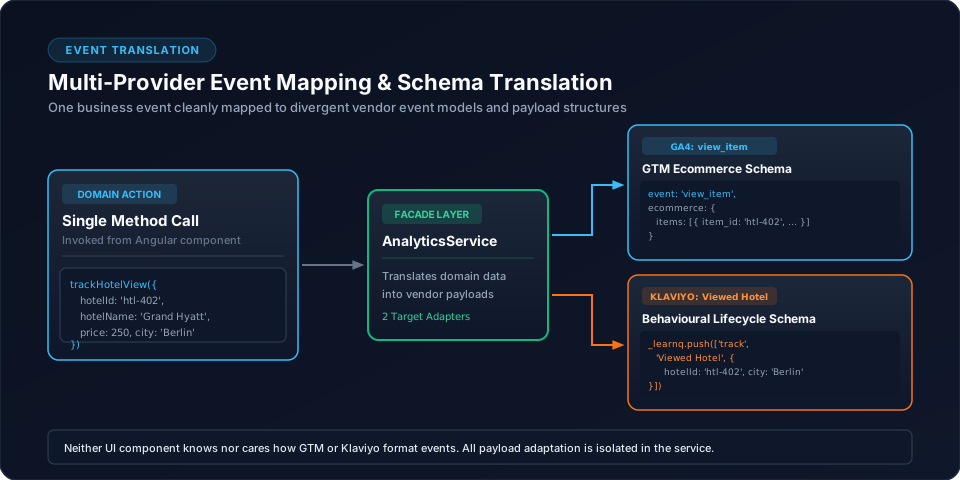
5. Cross-Cutting Responsibilities
A central analytics service can own concerns such as:
These concerns do not belong inside individual UI components.
6. Ecommerce State
For ecommerce events:
window.dataLayer.push({
  ecommerce: null
});
can establish a clean state before the next ecommerce payload.
This is much easier to enforce centrally than in every component.
7. Purchase Idempotency
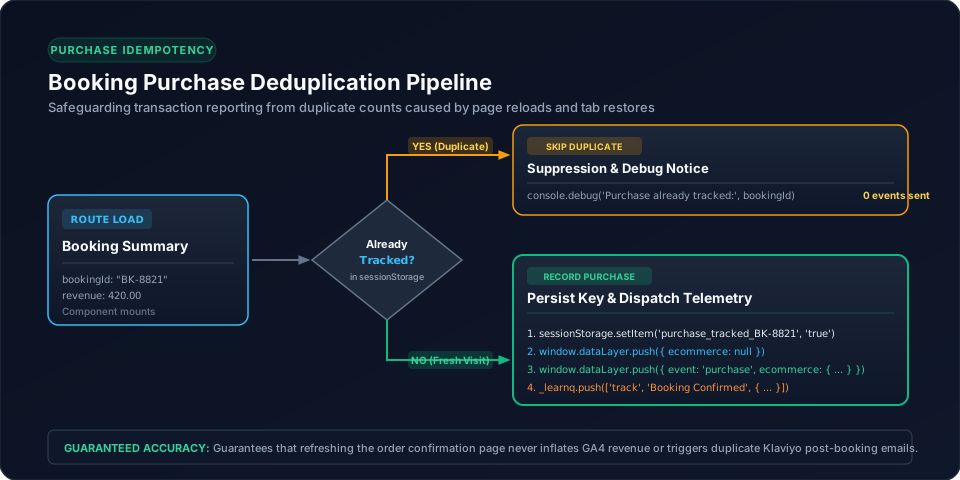
The analytics layer can protect transactions using the booking ID:
const key = `purchase_tracked_${bookingId}`;

if (sessionStorage.getItem(key)) {
  return;
}
This keeps duplicate transaction protection close to the tracking implementation.
8. Attribution State
Attribution can also be centralized:
URL
 ↓
AnalyticsService
 ↓
Capture
 ↓
Persist
 ↓
Reuse
This avoids duplicate URL parsing logic across the application.
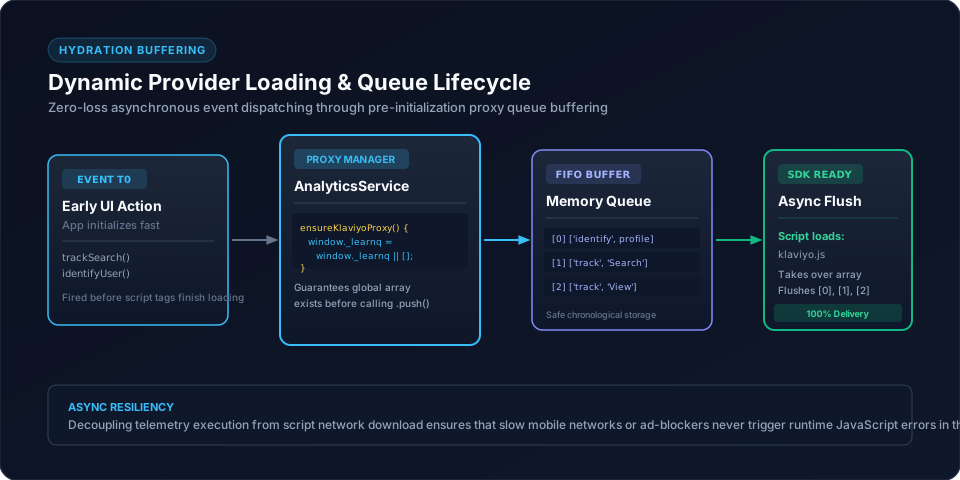
9. Provider Loading
Dynamic provider initialization belongs naturally in the analytics layer.
For example, the Klaviyo implementation uses a dynamic proxy/queue through:
ensureKlaviyoProxy()Components should not need to know whether the provider script is currently ready.
10. Keep Private Credentials Server-Side
When an operation requires a private Klaviyo API credential, route it through the backend:
Angular
   ↓
Backend
   ↓
Klaviyo
Do not place private provider credentials in the Angular bundle.
11. Testing Strategy
A centralized layer provides a clear testing boundary:
Business action
      ↓
AnalyticsService
      ↓
Expected provider event
Test:
12. Observability and Debugging
When tracking fails, inspect the pipeline:
Component
 ↓
AnalyticsService
 ↓
dataLayer / provider queue
 ↓
GTM/provider
 ↓
Destination
This gives developers a repeatable debugging path.
13. Common Mistakes
14. Conclusion
A reliable analytics layer is an architectural boundary, not just a utility wrapper.
For Angular applications using multiple analytics providers, centralizing business events, ecommerce state, attribution, deduplication and provider initialization produces a tracking system that is easier to maintain and debug.
Related Content
Need enterprise architecture consulting?
Explore our real-world case studies detailing production migrations, performance scaling, and high-throughput gateways.