
GA4 Custom Events vs Recommended Events: What Should You Use?
# GA4 Custom Events vs Recommended Events: What Should You Use?
When implementing GA4 in an Angular application, one of the first analytics design decisions is whether an interaction should use a recommended event or a custom event.
For a hotel booking platform, this decision appears throughout the booking journey:
Search
 ↓
Hotel Results
 ↓
Hotel View
 ↓
Rooms Loaded
 ↓
Selection
 ↓
Checkout
 ↓
Payment
 ↓
Purchase
Some stages map naturally to established GA4 event concepts. Others represent application-specific behaviour and may need custom events.
The important point is to choose events deliberately rather than creating a custom event for every application action.
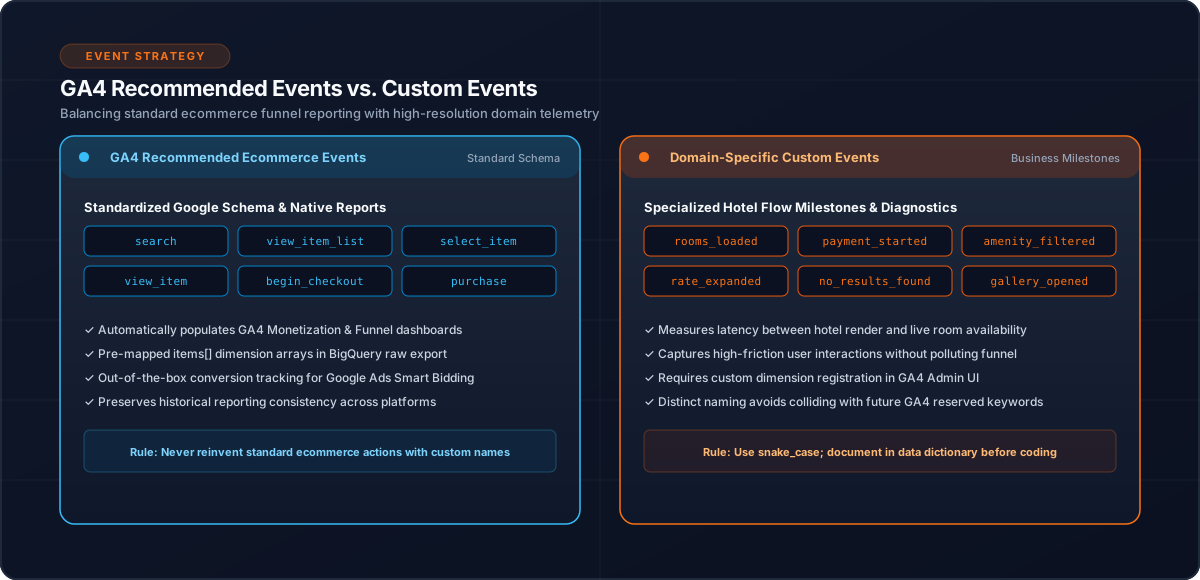
1. Recommended Events and Custom Events
A useful conceptual distinction is:
GA4 event model
      |
      +----> Recommended event
      |
      +----> Custom event
Recommended events provide established event semantics.
Custom events are useful when the business action does not fit an existing event model or when the application needs a domain-specific signal.
2. Start With the Business Action
Do not begin with:
"What event name should I send?"
Begin with:
"What customer action am I trying to measure?"
For example:
Customer searches for Sydney
        ↓
Search action
or:
Room availability successfully retrieved
        ↓
Rooms loaded
The event name should follow the business meaning.
3. Use Established Events Where They Fit
A hotel booking funnel can contain events such as:
| Application action | GA4 event |
|---|---|
| Search | search |
| Hotel result list | view_item_list |
| Hotel view | view_item |
| Selection | select_item |
| Checkout | begin_checkout |
| Payment | payment_started |
| Completed booking | purchase |
The application should use established semantics where they accurately represent the action.
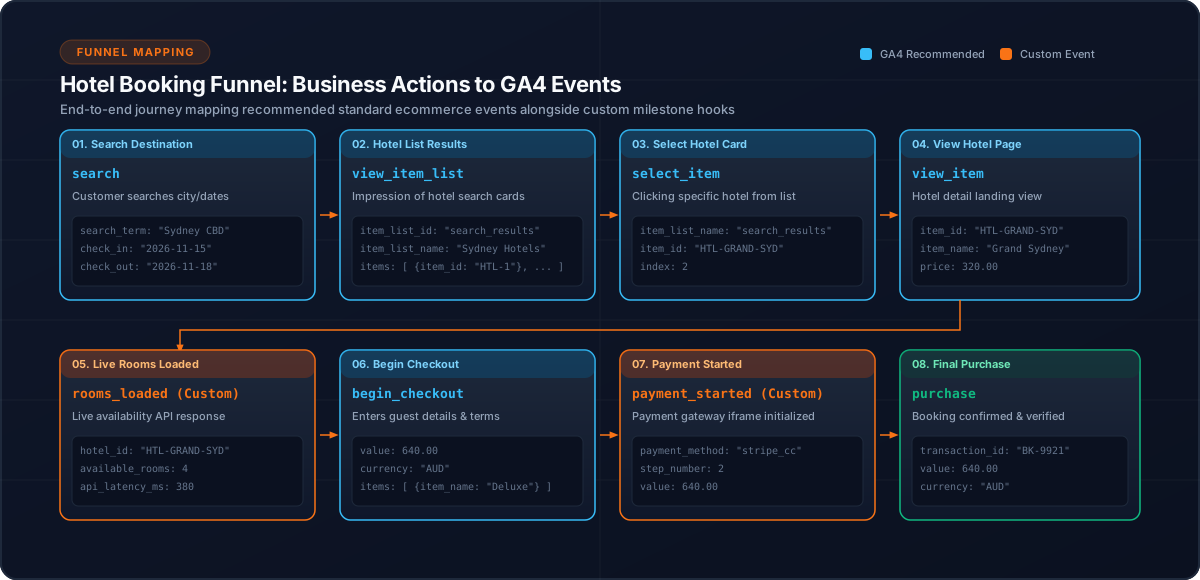
4. When a Custom Event Makes Sense
Some application actions do not necessarily map to a standard ecommerce event.
For example:
Rooms successfully loadedcan be represented by:
rooms_loadedThis event is specific to the application's hotel availability workflow.
The same applies to other domain-specific signals when they provide meaningful analytical value.
5. Avoid Custom Events for Everything
A poor analytics model might produce:
hotel_card_clicked
hotel_component_loaded
room_component_loaded
button_clicked
checkout_component_loaded
payment_component_opened
These events describe implementation details rather than business behaviour.
Prefer:
view_item
select_item
begin_checkout
payment_started
purchase
where those semantics fit.
6. Event Names Should Be Stable
Once an event becomes part of the analytics contract, changing its name casually can fragment historical reporting.
For example, avoid moving between:
hotel_view
hotel_viewed
view_hotel
ViewedHotel
Choose a stable convention.
7. Parameters Matter Too
The event name alone is not enough.
A hotel event can contain relevant item information:
{
  event: 'view_item',
  ecommerce: {
    items: [
      {
        item_id: hotelId,
        item_name: hotelName
      }
    ]
  }
}
The event should provide enough context to answer the intended business question.
8. Keep Provider-Specific Mapping in the Analytics Layer
Angular components should not need to decide how every event is represented.
Prefer:
this.analyticsService.trackHotelView(data);The analytics service can determine the appropriate GA4 event and payload.
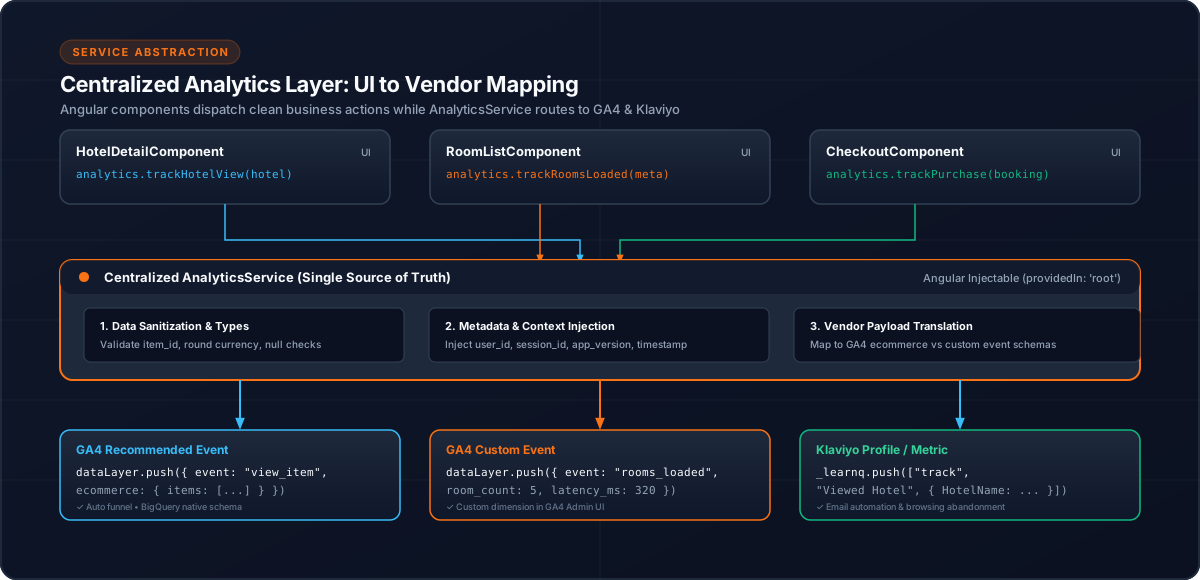
9. Hotel Booking Example
Consider the sequence:
Hotel View
     ↓
Rooms Loaded
     ↓
Room Selected
     ↓
Checkout
view_item and begin_checkout have clear ecommerce meanings.
rooms_loaded may be a custom application event because it represents a domain-specific technical/business milestone.
This combination is valid when each event has a clear purpose.
10. Testing Event Semantics
For each event ask:
11. Common Mistakes
12. Conclusion
The goal of GA4 event design is not to maximize the number of events.
Use established event semantics when they fit the business action and introduce custom events only when the application has a meaningful behaviour that needs its own signal.
For a hotel booking platform, this creates an event model that is easier to understand, analyze and maintain.
Related Content
Need enterprise architecture consulting?
Explore our real-world case studies detailing production migrations, performance scaling, and high-throughput gateways.