
Client-Side vs Server-Side Analytics Tracking: When to Use Each
# Client-Side vs Server-Side Analytics Tracking: When to Use Each
Analytics events do not all belong in the same execution environment.
A useful architecture distinguishes between:
Browser-side user behaviour
            +
Server-side operations
The correct choice depends on what is being measured, what data is available, and where credentials must remain private.
In the hotel booking implementation, browser-side GTM/GA4 and Klaviyo behaviour tracking coexist with a server-side newsletter subscription integration.
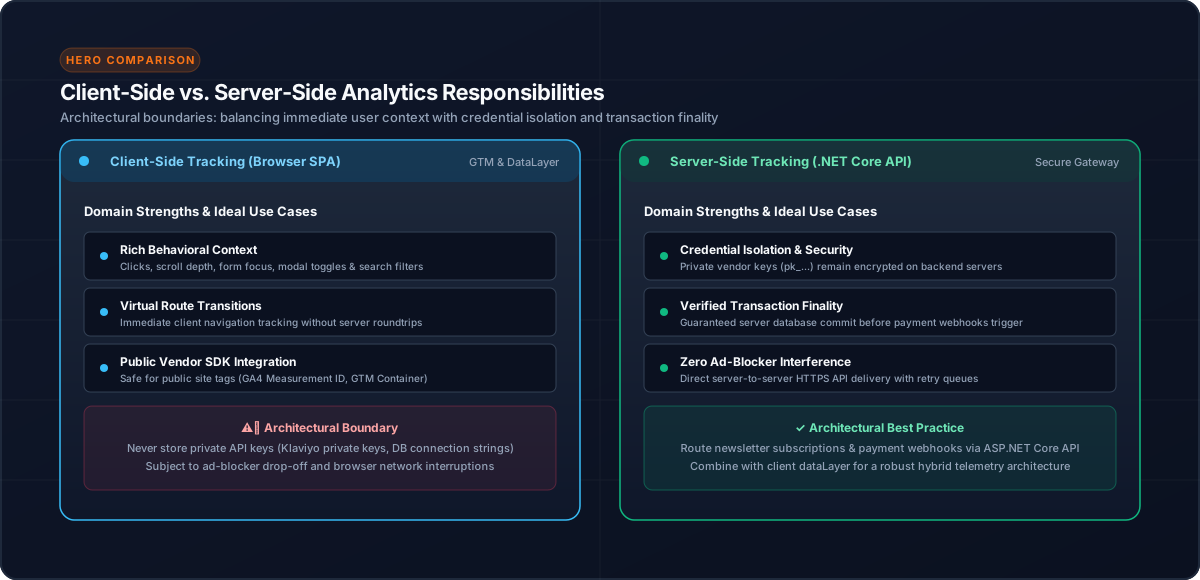
1. Client-Side Tracking
Browser-side tracking is well suited to actions that happen in the user's interface.
Examples from the booking journey include:
search
view_item_list
view_item
rooms_loaded
select_item
begin_checkout
payment_started
purchase
The Angular application sends business actions through its centralized AnalyticsService.
Angular UI
    ↓
AnalyticsService
    ↓
dataLayer / provider integration
2. Why Client-Side Tracking Fits User Behaviour
The browser has direct knowledge of actions such as:
These are naturally tied to the user interface.
3. Server-Side Integration
Server-side integration is appropriate when an operation requires trusted backend execution or private credentials.
In the implementation, newsletter subscription to Klaviyo is handled by the backend:
Angular application
      ↓
POST /User/SubscribeToklaviyo
      ↓
Backend
      ↓
Klaviyo
This keeps the private Klaviyo API key on the server rather than exposing it in browser code.
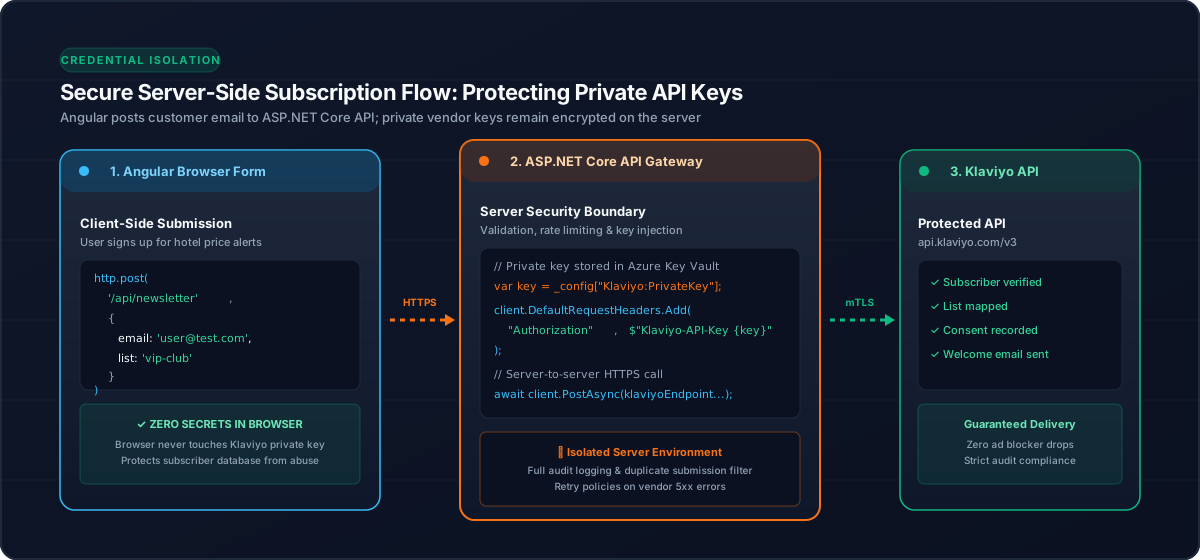
4. Do Not Expose Private API Credentials
A browser application should not contain a private provider API key simply because the browser needs to trigger an operation.
Instead:
Browser
  ↓
Authenticated/application API
  ↓
Server
  ↓
Provider using private credential
This is especially important for operations that require privileged provider access.
5. One Architecture Can Use Both
Client-side and server-side tracking are not competing architectures.
They can coexist:
                         Hotel Booking Application
                                  │
                    ┌─────────────┴─────────────┐
                    │                           │
              User behaviour              Private operation
                    │                           │
              AnalyticsService              Backend API
                    │                           │
              GTM / GA4 / Klaviyo          Klaviyo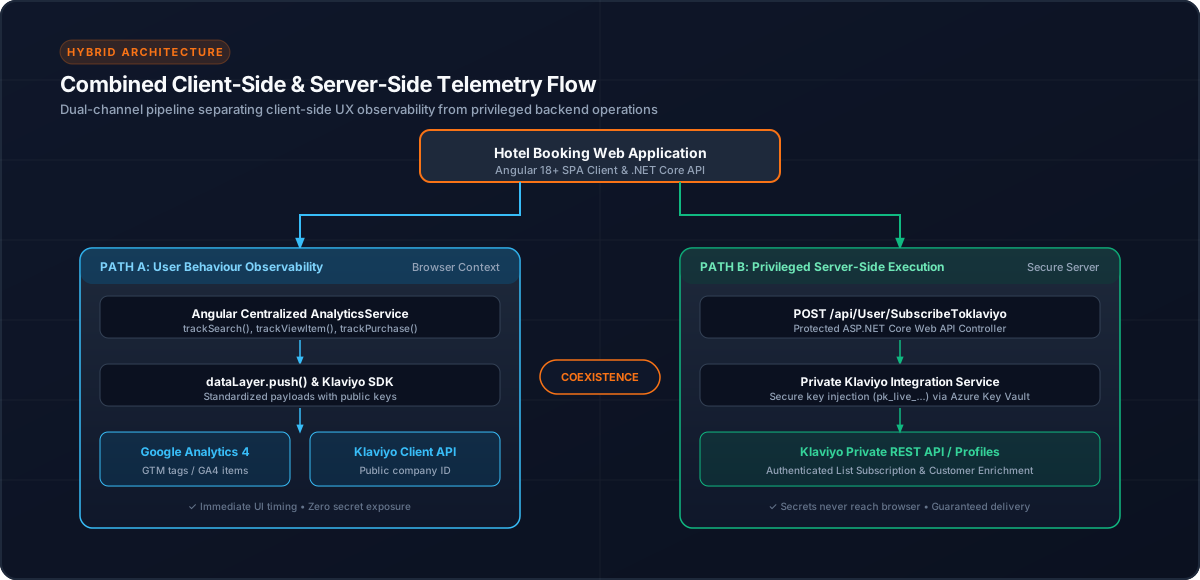
6. Avoid Duplicating the Same Business Event
Using both sides does not mean every event should be sent twice.
Before adding a second tracking path, decide:
Who owns this event?For example:
Hotel viewed       → browser
Checkout started   → browser
Newsletter request → backend integration
The ownership should be explicit.
7. When Browser Tracking Is a Good Fit
Use client-side tracking when:
8. When Server-Side Integration Is a Good Fit
Use server-side integration when:
9. Purchase Tracking Requires Care
A completed booking is a business transaction, but browser-side purchase tracking can still be appropriate when the application controls the confirmation journey.
The implementation protects application-generated purchase events with session-level deduplication keyed by booking ID.
Booking confirmation
      ↓
Check booking ID
      ↓
Already tracked?
  ├── Yes → skip
  └── No  → send purchase → store key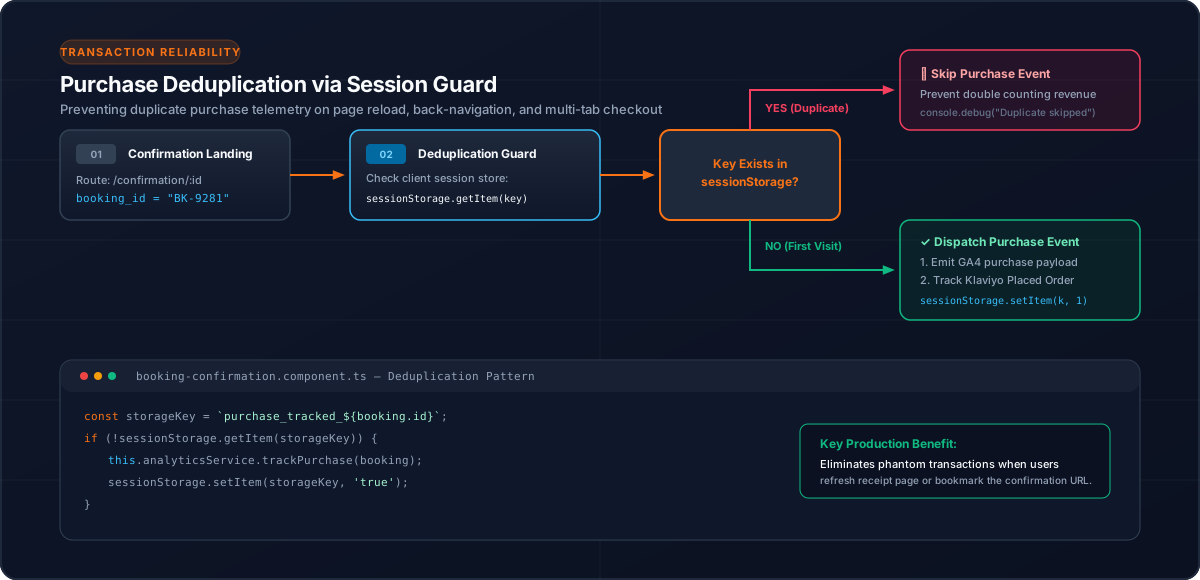
This is different from claiming that the purchase must be server-side. The tracking location should match the architecture and reliability requirements.
10. Decision Checklist
Ask:
| Question | Likely choice |
|---|---|
| Is it a UI interaction? | Client-side |
| Does it require a private API key? | Server-side |
| Is the browser the source of timing/context? | Client-side |
| Is the backend the trusted owner? | Server-side |
| Could sending from both sides create duplicates? | Define one owner |
Conclusion
Client-side and server-side analytics solve different problems.
For an Angular hotel booking application, a centralized browser analytics layer is a strong fit for user behaviour, while backend integrations are appropriate for privileged operations such as provider API calls that require private credentials.
The important architectural principle is to make event ownership explicit and keep secrets on the server.
Related Content
Need enterprise architecture consulting?
Explore our real-world case studies detailing production migrations, performance scaling, and high-throughput gateways.